Make Bad Data Stop the Script: Why a Loud Stop Beats a Quiet Mistake
With Josh Schultz ·
Answer. Make bad data stop the script means you tell a report script to halt and print one plain message when it meets a value it cannot trust, instead of guessing or skipping it. People call this failing loudly, because you notice the problem right away. A loud stop that names the file and the value costs you a minute, while a quiet mistake can cost you a bad buying decision.
The picture
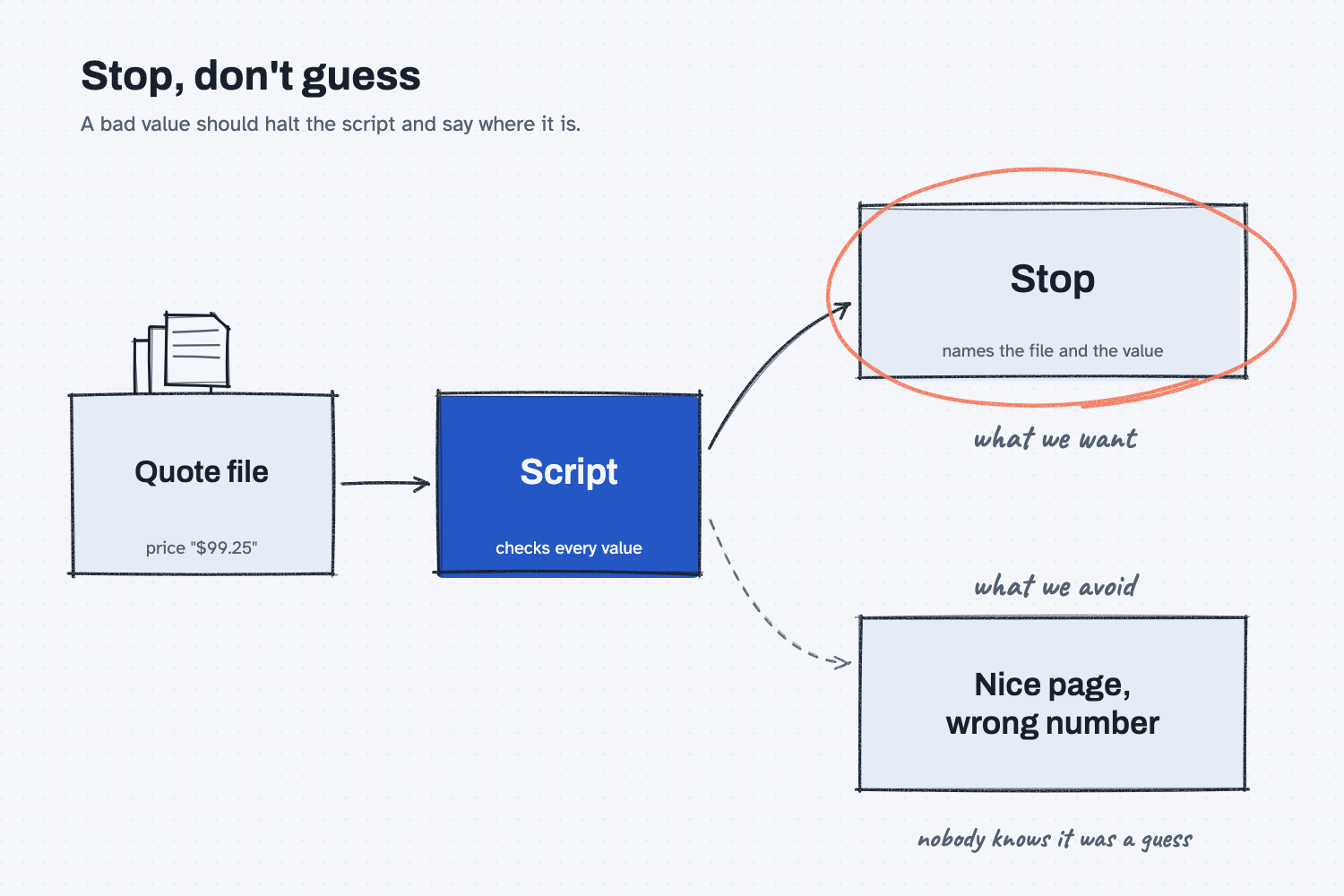
Read the picture from left to right. A saved quote file goes into the script, and one of its prices was typed as "$99.25", with a dollar sign, which a computer treats as text and not as a number. The path along the top is the one we want: the script stops and tells you exactly which file and which value caused the trouble. The path along the bottom is the one we are avoiding, where the script quietly works around the problem and hands you a clean page that has a wrong number hiding in it.
Think of it like this
Picture the incoming inspection bench at a shop, with a go/no-go gauge sitting on it. A part that fits the gauge goes on to the floor. A part that does not fit gets a red tag that says which part it is and which dimension was off, and it is set aside until someone decides what to do with it.
Now imagine the inspector who is in a hurry. A part is a little off, so he files it down until it fits, and he sends it along without a word. The part now passes, and nobody knows it was ever wrong. Everyone would agree that the red tag is the better habit, even though it slows the line down for a moment, because the person who files the part quietly has hidden the very information you needed.
A script that handles bad data is the same kind of inspector. You want the one who tags the part and says why.
Why does it matter at work?
A report looks trustworthy because it is tidy, and a tidy page with a wrong number in it is harder to catch than a messy one. When you compare prices month to month, you will not re-add every row by hand, so you rely on the page being right.
Here is an example from Mesquite Ridge Metal Works. A buyer keeps one saved file for every past quote, and a script reads all of them to build a price history page. The newest file, from Red Creek Steel Supply, has two small problems. The quote date is written as 12/01/2026, which could mean December 1 or January 12, and the price for one part was typed as "$99.25" with a dollar sign.
A script that guesses would pick a date, strip the dollar sign, and produce a page where everything lines up. Nothing on that page would tell the buyer that two guesses were made on the way. A script that stops instead prints this and writes nothing at all: "Bad data in file quotes-MRMW-RFQ-1150.json: field [0].quote.date has value '12/01/2026' (must be a real date written YYYY-MM-DD). Nothing was written." The buyer sees the problem within seconds and fixes it at the source, which is the saved file.
How does it work?
It works through three parts, and you can ask for all of them in plain words when you have Claude build the script. The first part is a clear message, the second is a stop before anything is written, and the third is that you fix the data and not the script.
In the guide this lesson comes from, the whole idea is one line, rule 6 of the build prompt: "If a file has bad data, stop and print one plain message that names the file, the field, and the value. Do not guess and do not skip it quietly."
The message names the file, the field, and the value. A message that only says "error" sends you hunting. A message that names the file, the spot inside it, and the exact value tells you where to look, and you can often fix it in under a minute. You also learn what the script expected, such as a real date written year first.
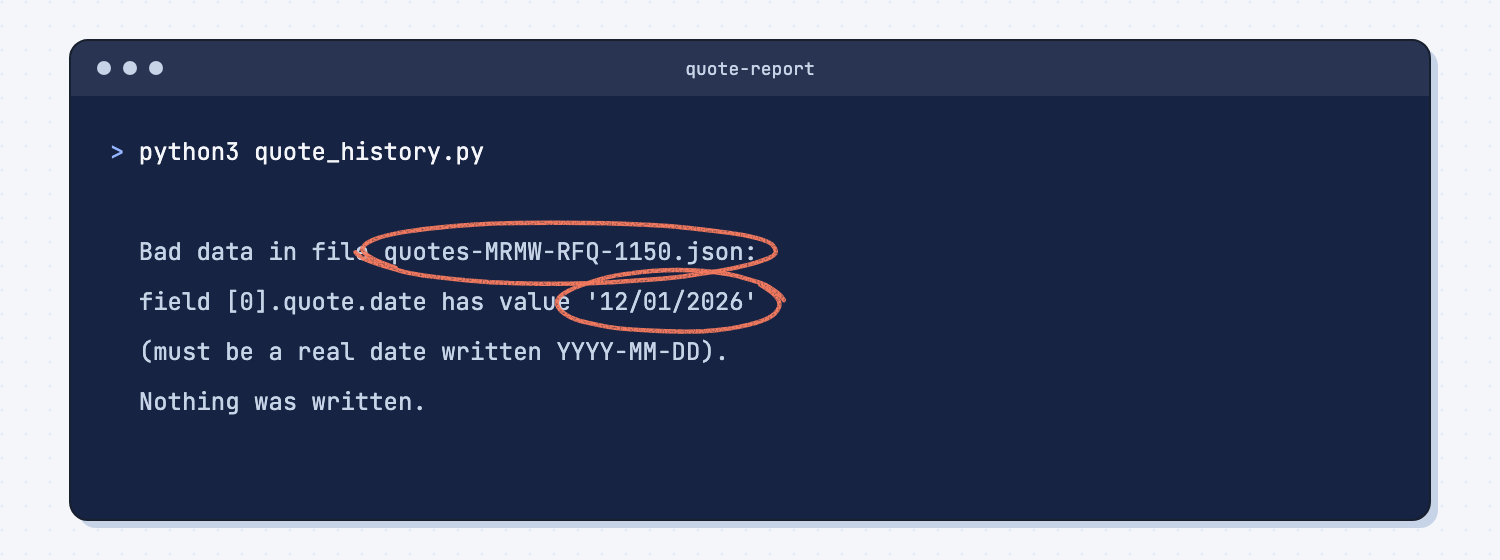
The script stops before it writes anything. The words "Nothing was written" matter, because they tell you there is no half-finished page lying around that someone might open by mistake. Either you get a whole page you can trust or you get a message.
You fix the data, not the script. Most of the time the script did its job and the file is the problem. You paste the message into the chat, say what you expected, and Claude fixes the value. In the guide's example, Claude found a second bad value that the first message had not mentioned, because the script stops at the first problem it finds. It also said it had guessed that 12/01/2026 meant December 1, gave its reasons, and asked for a confirmation. The guide's advice is to always confirm a guess about your own data, since you know your suppliers and Claude does not.
This is also why the idea fits so well with scripts in particular. A script follows its rules the same way every time, which people call deterministic, so a stop rule you write once will fire the same way next month. The comparison script in compare supplier quotes the same way every time stops on bad values too, for example when a unit price arrives as text.
Where do people get it wrong?
Most mistakes come from wanting the tool to be helpful, because helpful sounds good until it is helping with your data.
- They ask the tool to "handle" messy values. Fixing a dollar sign sounds harmless, but you did not get to see what else was changed. Ask it to stop and show you instead.
- They write the stop rule after the first bad page. It is easier to put the rule in the very first request, so the script never learns to guess.
- They skip the message. The message is how you find out what the script saw. Read it, and paste the exact words into the chat when you ask for a fix, because Claude can only fix what it can see.
- They expect every problem at once. The script stops at the first bad value, so a second one may only show up on the next run, and that is normal.
- They confirm nothing. If Claude guesses what a value meant, check the guess against your own records before you save the file.
Try this in 2 minutes
This test uses a tiny version of the same situation, with three prices where one has a dollar sign. You can use any chat tool, and you will run it twice, once without a stop rule and once with one.
- Open a new chat and paste this:
These are the unit prices from three saved quote files for part MR-3001.
quotes-MRMW-RFQ-1142.json: unit_price 94.50
quotes-MRMW-RFQ-1150.json: unit_price "$99.25"
quotes-MRMW-RFQ-1151.json: unit_price 101.00

Give me the average unit price across the three files.
- Read the reply. Then open a second new chat and paste the same text with this sentence added at the end: "Rule: every unit_price must be a plain number. If any value is not, do not guess and do not fix it. Stop, and tell me the file name and the exact value."
- Compare the two replies, and notice what you were told in each.
Without the rule, the reply gave the average and added, "Note that the RFQ-1150 value was stored as the string "$99.25" rather than a number, so I stripped the dollar sign before averaging." That is a fair note, and it came with a good answer of 98.25, but you only saw the change because the reply happened to mention it. A script that did the same thing would likely say nothing at all.
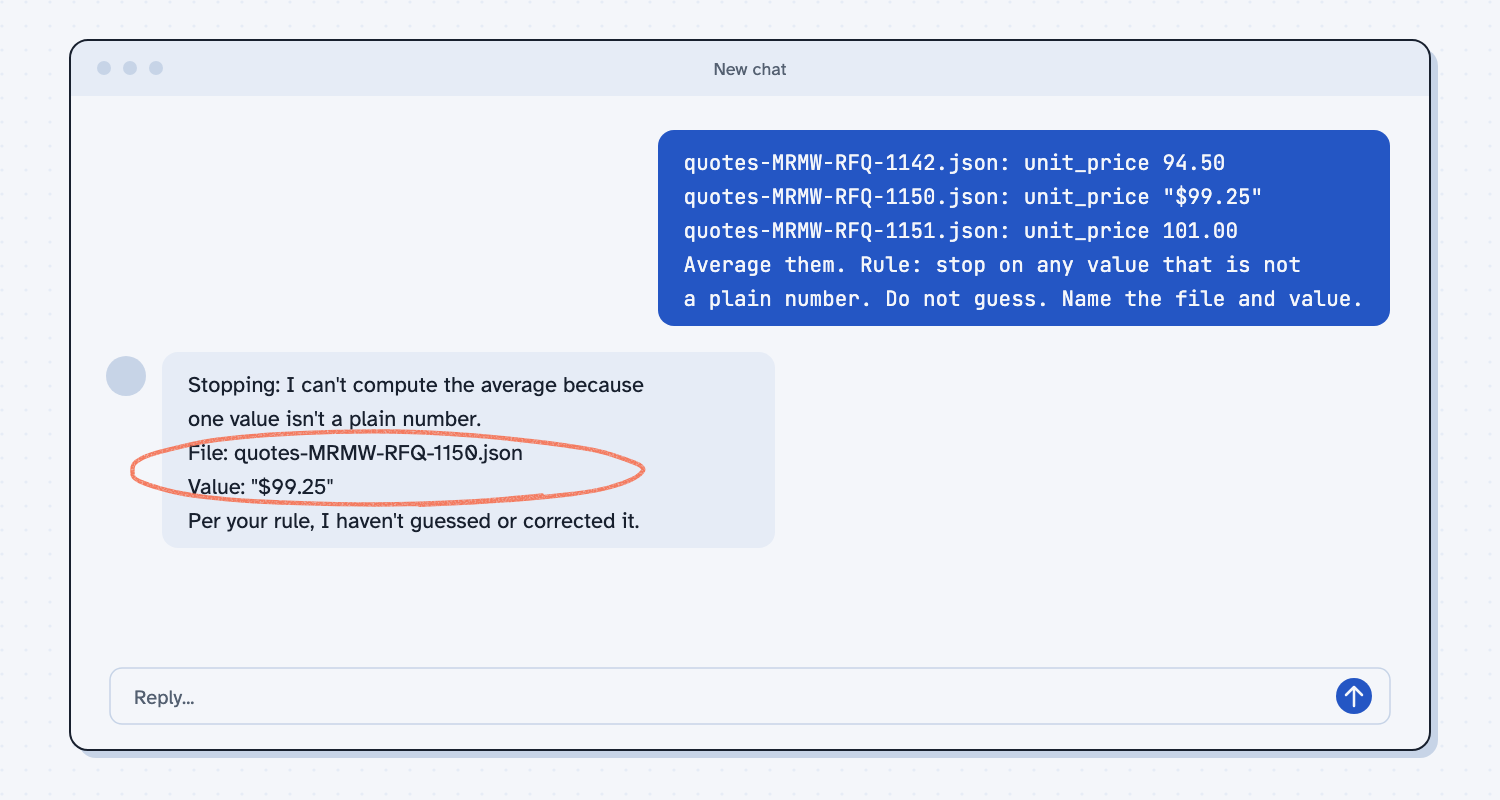
With the rule, the reply began, "Stopping: I can't compute the average because one value isn't a plain number." It then listed the file as quotes-MRMW-RFQ-1150.json and the value as "$99.25," and said, "Per your rule, I haven't guessed or corrected it." That is the loud stop, and it also offered to continue once you fixed the file or approved treating the value as 99.25.
Frequently asked questions
What does fail loudly mean?
It means that when something is wrong, the tool announces it clearly and stops, instead of carrying on and hiding the problem. The opposite is failing quietly, where the tool keeps going and you find out much later.
Is stopping the script annoying?
For a minute, yes. A stop costs you a minute of fixing one value, while a quiet mistake can sit in a report for months and shape a decision before anyone notices it.
What counts as bad data?
Anything the script cannot be sure about, such as a price typed with a dollar sign, a date that can be read two ways, an empty field that should have a number, or a unit you did not expect. You decide the list when you write the rule.
Can I let the script fix small things on its own?
You can, but only if it shows you each change it made. A fix you can see is a decision you made, while a silent fix is a guess made for you.
Does this work for reports that are not about quotes?
Yes. A late PO list, a freight bill summary, or a receiving log can all use the same rule, because every one of them reads saved files that someone typed.
Use it today
- Have Claude build your quote report: put the stop rule in the build prompt and practice on a file that is really broken.
- Related idea: Ask AI for the tool, not the answer.
- Related idea: Fix the instructions, not the output.
- Related idea: Save every version that works, so a bad change is one step from undone.
From my training: the stop rule is rule 6 in the build prompt I teach, and it goes into the very first request so the script never gets the chance to guess.