- Claude
AI app. An AI chat app. You type or paste text, or add a file, and it writes back.
Answer. To compare supplier quotes with AI the same way every time, have Claude read each quote and fill in one fixed JSON shape (a set list of labeled blanks). Then a small script turns that data into an HTML comparison page, with no AI. Same data in, same page out, every time, with missing terms and math errors flagged.
Time and cost. 25 minutes the first time, about 10 after that. $0 to practice with the sample quotes on the free Claude plan. Who this is for. Buyers and estimators who get quotes in five formats and need one clean comparison.
You can paste three quotes into a chat and ask, "Which is best?" You will get an answer. Ask again tomorrow and the table looks different. Columns move. A term that showed up yesterday is gone. That is fine for a one-time look. It is not fine for a buying process.
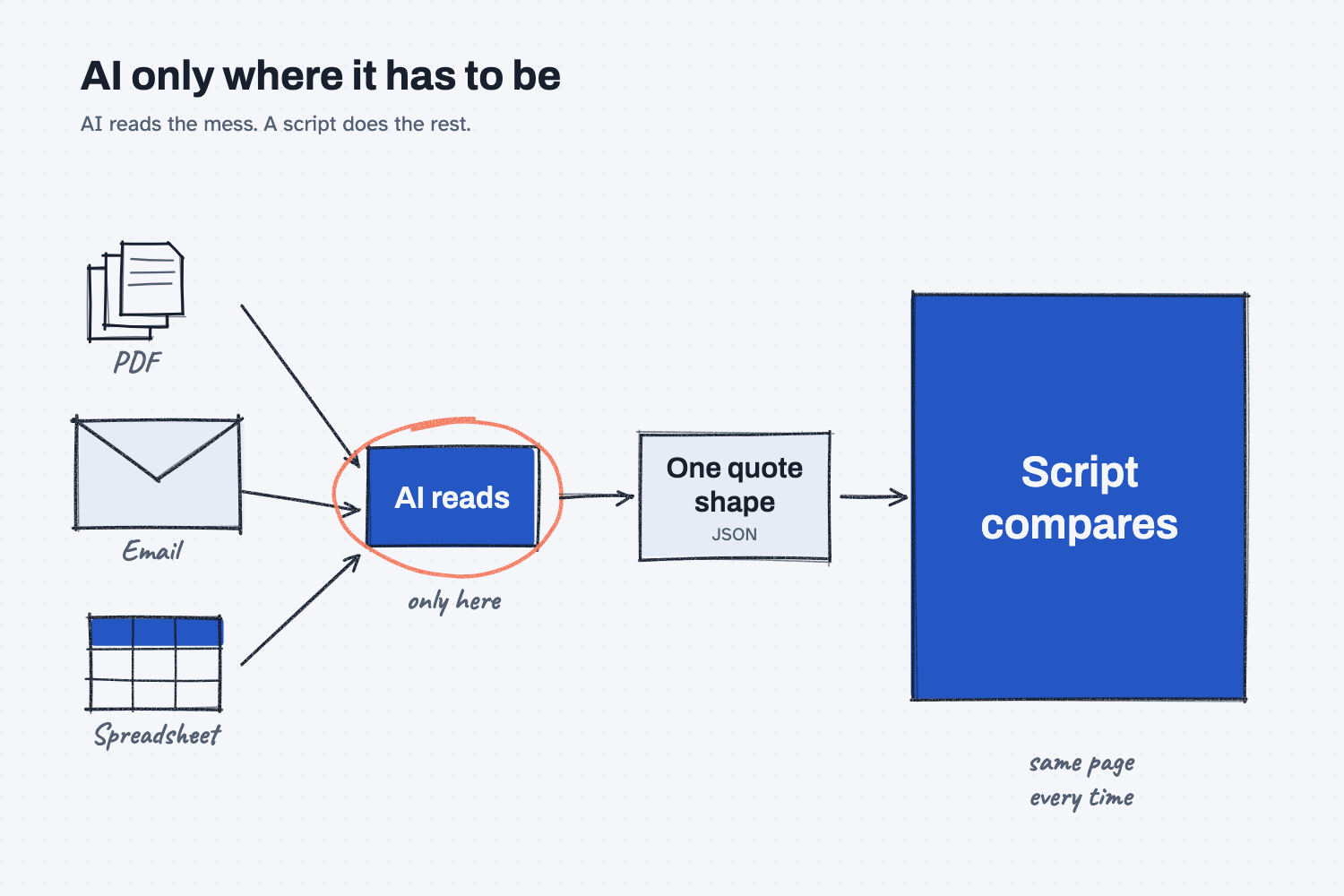
This guide splits the job in two. AI does the one part only AI can do: read messy quotes and write down what they say. A script (a small program that does the same steps every time) builds the comparison from that data.
What will I learn besides comparing quotes?
You will learn five methods you can reuse on POs, invoices, freight bills, and more. Each one has a short "why" later in this guide.
- Split reading from deciding. AI reads. A script compares.
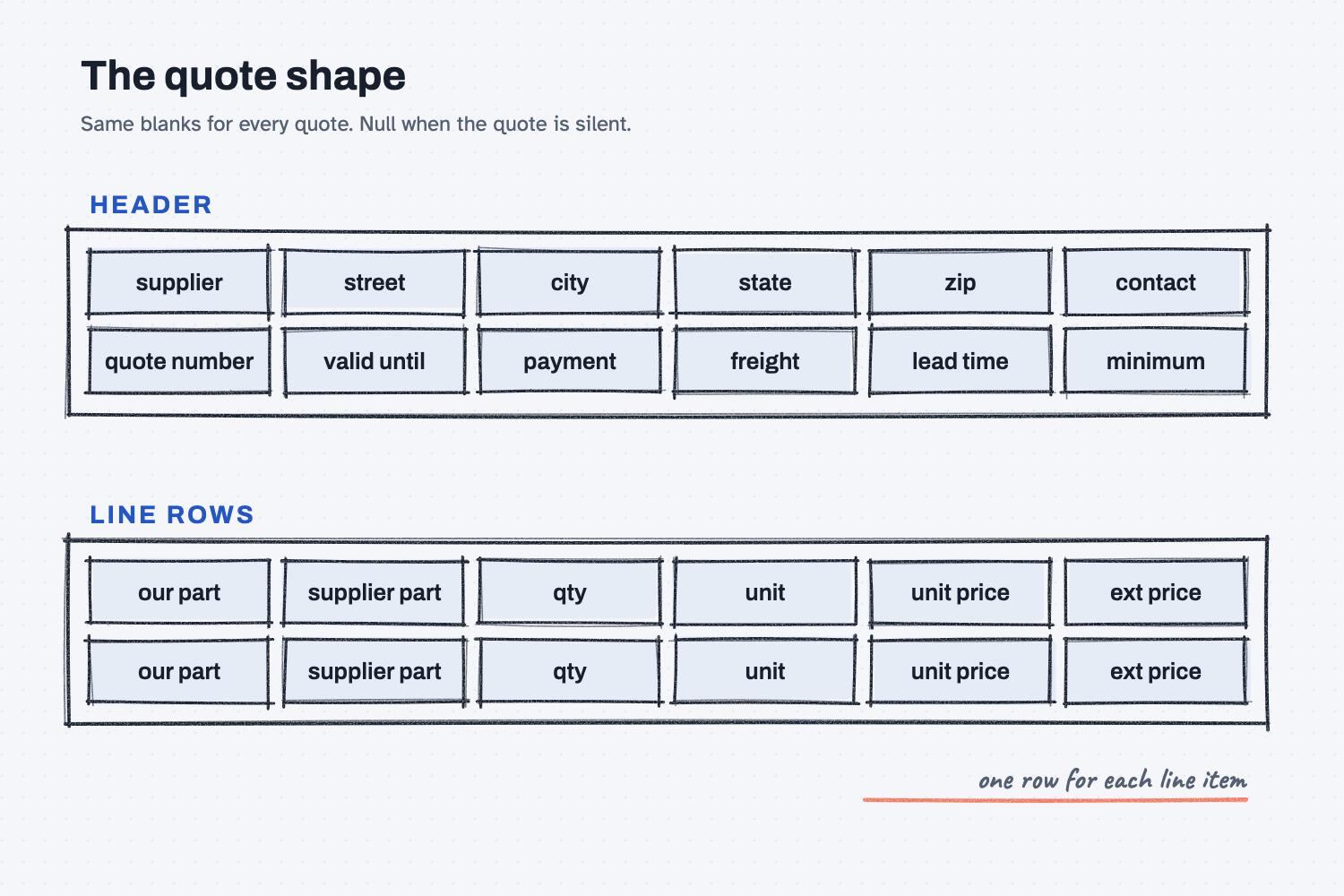
- Give AI a shape to fill. Same blanks every time, with null (empty on purpose) when the quote is silent.
- Push the math to a script. No tokens (the units AI tools charge by), no guessing, same answer every time.
- Control the output with a template. The script draws the same page for every RFQ. Improve the script once, and every RFQ gets better.
- Save the data, not only the report. Next year, a script can read every quote you ever compared.
What do I need before I start?
You need Claude and the files below. Nothing to install.
- Claude at claude.ai. The free plan works for practice. Claude must be able to run code: in Settings, then Capabilities, turn on Code execution and file creation if it is off.
- The three sample quotes for RFQ MRMW-RFQ-1142 (sample data, a made-up company):
- quote-red-creek-steel.pdf, a PDF quote with letterhead
- quote-panhandle-bar-plate.txt, an email
- quote-cedar-flats-metals.xlsx, a formatted Excel quote
- The script: build_comparison.py. It turns quote data into a comparison page. You never open it. Claude runs it for you.
Safe use. Real quotes hold prices and supplier names. Check your company rules before you attach them to any AI tool. Use the sample quotes to learn. Read the safe use notes.
How do I compare supplier quotes with AI?
Have Claude turn each quote into the same JSON shape, check it, then have Claude run a fixed script that builds the comparison page from that JSON. Seven steps.
Step 1. Make a folder for the RFQ
Make a folder named RFQ-1142. Put the three quote files and build_comparison.py inside it.
One folder per RFQ keeps the quotes, the data, and the comparison together. You will be glad of it in a year.
Step 2. Attach the quotes to a new Claude chat
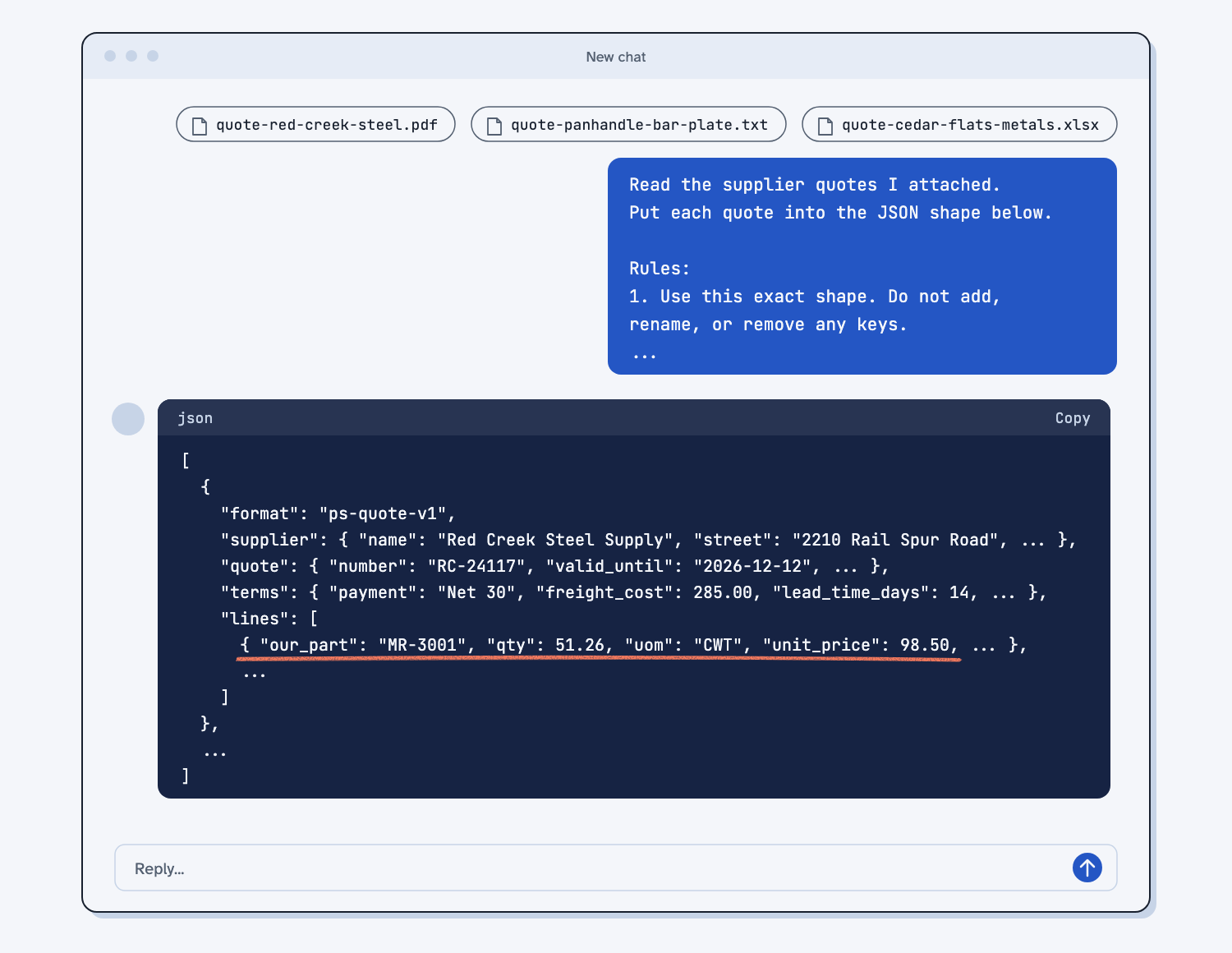
Open claude.ai and start a new chat. Click the + button at the bottom left of the message box and choose Upload a file, or drag the three quote files onto the chat. You will see three file chips above the box.
Step 3. Paste the extract prompt with your part numbers
Copy the prompt below. Replace [YOUR PARTS] with your part numbers. For the sample, paste these two lines:
MR-3001 = 4140 bar, 2 in. round, 12 ft
MR-3002 = A36 plate, 1/2 in. x 48 x 96
Send it. Claude replies with one block of JSON (a plain-text format of labels and values that programs can read) and a file named quotes-MRMW-RFQ-1142.json.
Read the supplier quotes I attached. Put each quote into the JSON shape below.

Rules:
1. Use this exact shape. Do not add, rename, or remove any keys.
2. If the quote does not say it, write null. Do not guess. Do not fill in what is normal.
3. Numbers are plain numbers, like 1250.5. Not "$1,250.50". Dates are YYYY-MM-DD.
4. Copy prices, quantities, and units exactly as quoted. Do not convert units. Do not fix the supplier's math.
5. Only two small calculations are allowed. valid_until: if the quote gives a number of days, add them to the quote date. lead_time_days: weeks times 7. If it is a range, use the high end.
6. freight_cost: if the quote gives a dollar amount for freight, write it, even if it says "estimate" or "around". Put the word estimate in notes. If freight is included or delivered at no charge, write 0. If the quote says there is no minimum, minimum_order is 0.
7. our_part: match each line to one of our part numbers below. If a line is not one of our parts, like an extra charge, write null.
8. ext_price: copy it only if the quote shows it. Otherwise null.
9. Put anything odd in notes. Estimates, ranges, surcharges, conditions, random lengths.
10. Reply with one JSON code block and nothing else. If I attached more than one quote, reply with a list that has one entry per quote. If you can make files, also save it as quotes-[our RFQ number].json.

Our part numbers:
[YOUR PARTS, one per line. Example: MR-3001 = 4140 bar, 2 in. round, 12 ft]

Shape:
{
  "format": "ps-quote-v1",
  "supplier": { "name": null, "street": null, "street2": null, "city": null, "state": null, "zip": null, "phone": null },
  "contact": { "name": null, "email": null, "phone": null },
  "quote": { "number": null, "date": null, "valid_until": null, "our_rfq": null, "currency": "USD" },
  "terms": { "payment": null, "freight": null, "freight_cost": null, "lead_time_days": null, "minimum_order": null },
  "lines": [
    { "line": 1, "our_part": null, "supplier_part": null, "description": null, "qty": null, "uom": null, "unit_price": null, "ext_price": null }
  ],
  "notes": []
}
The prompt holds the shape. Every quote gets the same blanks: a header with the supplier, the address in parts, the contact, and the terms, then one row per line item.
Step 4. Spot-check the JSON against the quotes
Check four things against the quote files before you build anything, the same way you would test any AI tool against answers you know. This takes about two minutes.
- Every unit price matches the quote.
- Every unit matches the quote: CWT, FT, EA, or SHEET. Nothing was converted.
- Each null is really missing from the quote. Panhandle should have null for payment terms.
- Cedar Flats line 2 still says 4500. That is the supplier's error. Claude should copy it, not fix it.
If something is wrong, tell Claude which value to fix. Do not fix it by hand in a new chat.
Step 5. Have Claude run the script on the JSON
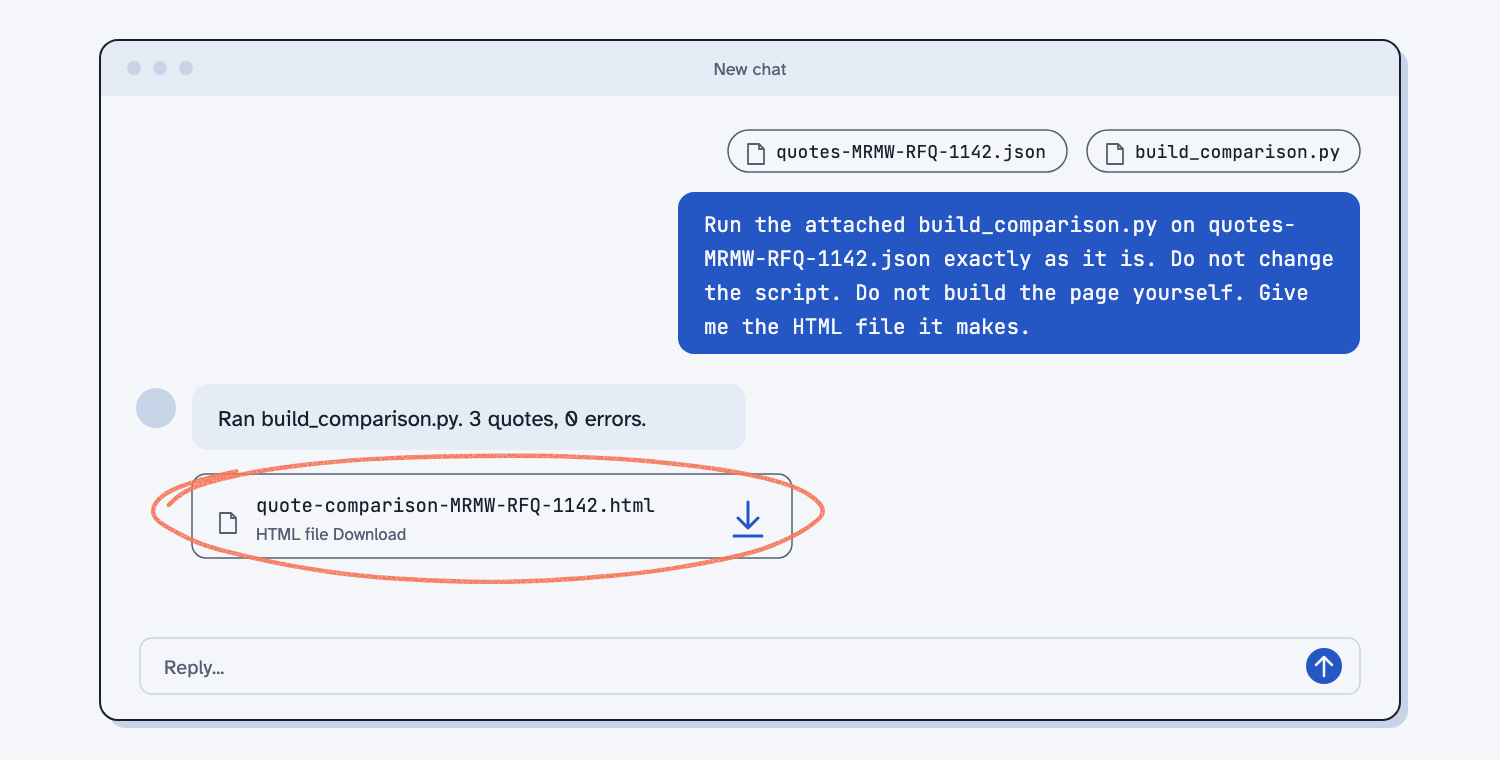
In the same chat, attach build_comparison.py and send the prompt below. Claude runs the script. It does not write the page itself. That is the point: the script draws the page the same way every time.
Run the attached build_comparison.py on my quotes JSON file exactly as it is.
Do not change the script. Do not write or design the page yourself.
Command: python3 build_comparison.py [JSON FILE]
Give me the HTML file it makes. If the script prints an error, show me the error and stop.
Claude replies with a file: quote-comparison-MRMW-RFQ-1142.html. If the script finds bad data, it stops and says which value, for example: unit_price must be a number. It says "$9.40". Ask Claude to fix that one value in the JSON, then run the script again.
Step 6. Open the comparison and read the Compare tab
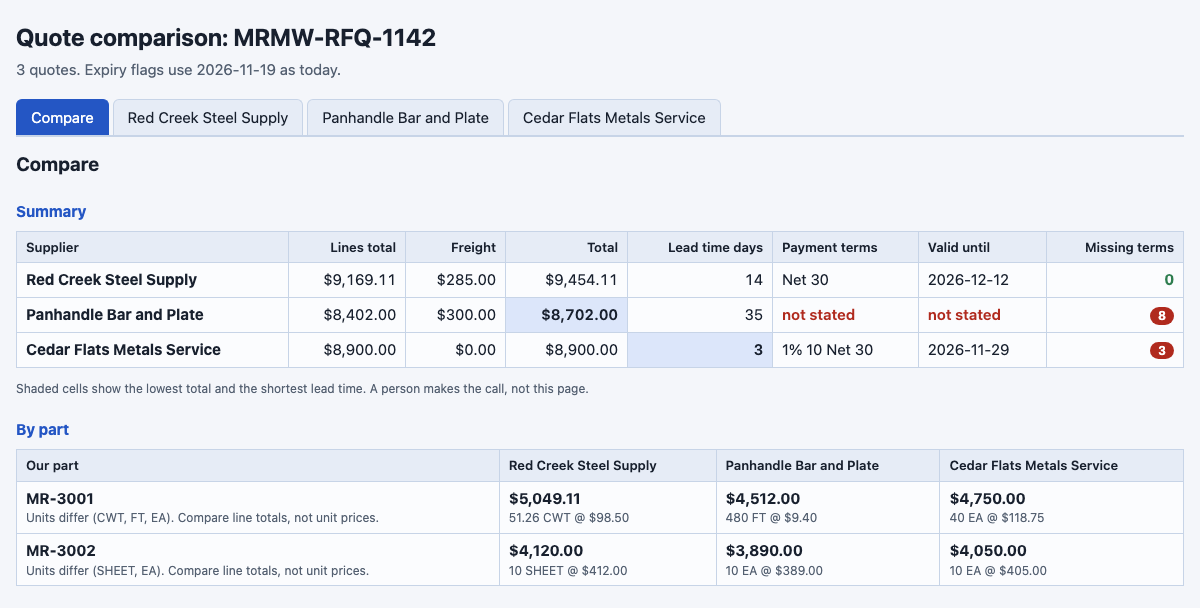
Download the HTML file and double-click it. It opens in your browser. The Compare tab shows five things, top to bottom.
- Summary. Total cost with freight, lead time, terms, and how many terms are missing, one row per supplier.
- By part. Line totals side by side. Here the units differ (CWT, FT, EA), so compare line totals, not unit prices.
- Missing terms. A grid of check marks and red MISSING marks.
- Flags. Math errors, extra charges, and quotes about to expire.
- Margin. At the bottom: the price you would need to quote at 15, 20, 25, and 30 percent margin for each supplier.
Each supplier also has its own tab, all in the same layout.
Step 7. Save the data and the page in the RFQ folder
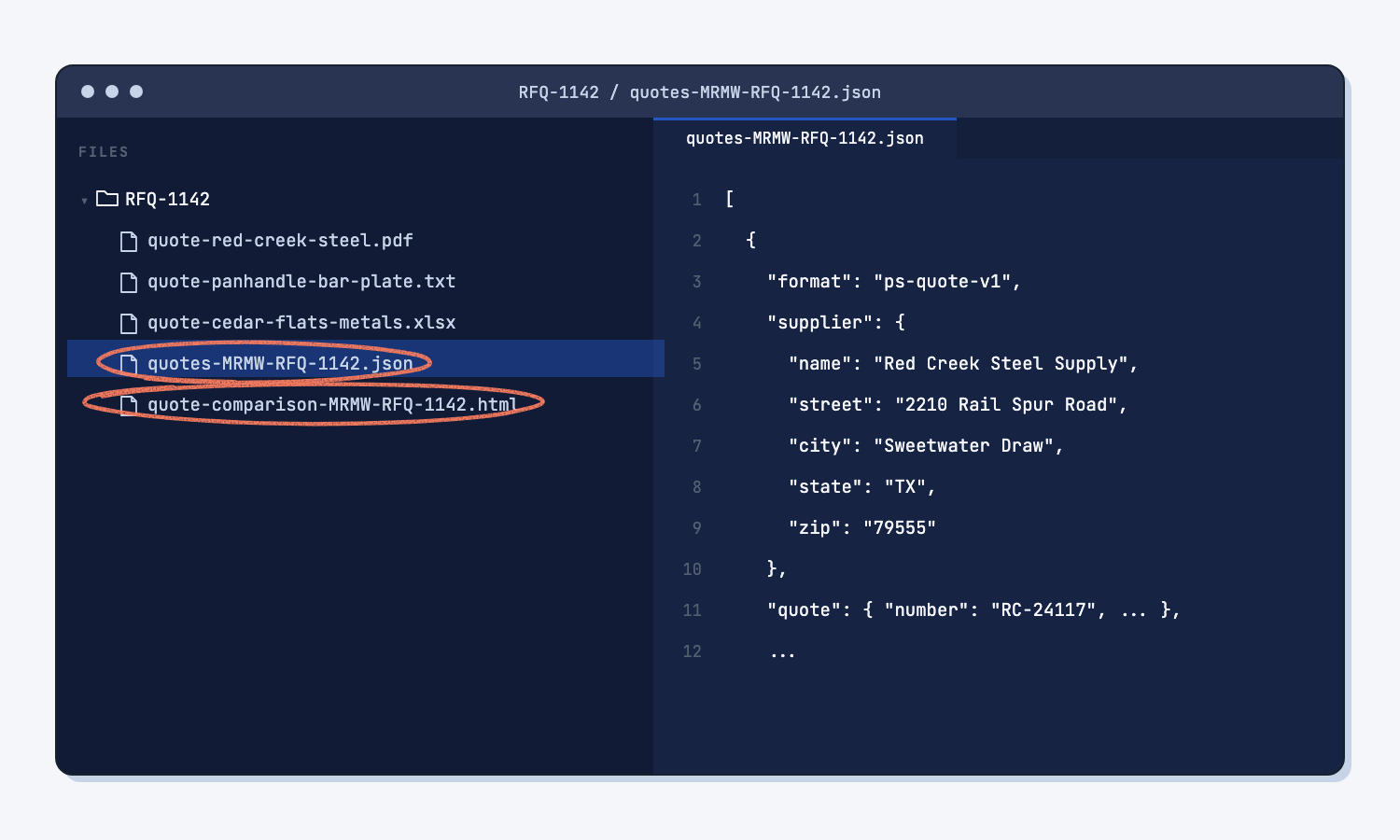
Save quotes-MRMW-RFQ-1142.json and quote-comparison-MRMW-RFQ-1142.html in RFQ-1142. The page opens any time with no AI. The JSON is the start of your quote history.
What does good look like?
With the sample quotes, the Compare tab shows these numbers. Answer key, sample data. The script did the math. I checked each total by hand. You can open the sample comparison page to see it.
| Supplier | Lines | Freight | Total | Lead time | Missing terms |
|---|---|---|---|---|---|
| Red Creek Steel Supply | $9,169.11 | $285.00 (estimate) | $9,454.11 | 14 days | 0 |
| Panhandle Bar and Plate | $8,402.00 | $300.00 ("around") | $8,702.00 | 35 days | 8 |
| Cedar Flats Metals Service | $8,900.00 | $0 (delivered) | $8,900.00 | 3 days | 3 |
And these flags:
- Cedar Flats line 2 math does not match: 10 x $405.00 = $4,050.00. The quote says $4,500.00.
- Cedar Flats line 3 is not on our RFQ: a $100.00 saw cut charge.
- Panhandle has no quote number, no expiry date, no payment terms, and no address.
- Units differ for both parts. Red Creek prices bar by weight (CWT). Panhandle prices it by the foot. Cedar Flats prices it by the bar.
The lowest total is not the whole story. Panhandle is cheapest but slowest, and it left out the terms you need. The page shows that. You decide.
What can go wrong?
Most problems happen in Step 3, when AI tries to be helpful. Rules in the prompt stop each one, but check anyway. Two more can happen.
AI fixes the supplier's math. It changes 4,500 to 4,050 and the error disappears. Step 4 catches it.
AI fills in what is normal. It writes "Net 30" for Panhandle because most quotes say that. Every null should be a real gap.
AI converts units. It turns $98.50 per CWT into a price per bar. Now you cannot check it against the quote.
AI drops a number it is not sure of. It writes null for "Est. $285.00" because it is only an estimate. The page then says "Freight cost not stated" and the total is short. Rule 6 tells it to keep estimated freight.
One line can be read two ways. Cedar Flats says "Delivered on our truck." One AI writes freight 0. Another writes null, because the quote never says "no charge". Both are fair readings. When the page says "Freight cost not stated", do not argue with it. Call the supplier and ask.
AI skips a file. A PDF that will not read, or a third attachment it never opens, and you get two quotes back instead of three. Count them: three files in, three suppliers in the JSON. The comparison page lists every supplier it got, so a missing one shows.
AI builds the page itself. If code is off, or the prompt is loose, Claude may write its own comparison instead of running the script. It looks fine, but it is not your template, and next time it will look different. The reply should say it ran
build_comparison.py. If not, turn on code execution and send the Step 5 prompt again.
How do I check the answer?
Check the page against the quotes, not against Claude. The script's math is fixed, so check what went into it.
- Each unit price and unit on the quote tabs matches the quote file.
- Each MISSING is really missing from the quote.
- Each total matches your own calculator for one supplier.
- No supplier is picked for you. You pick.
Why does this way work?
It works because each part of the job goes to the tool that is best at it. Here is the short "why" behind each method.
Split reading from deciding. AI is good at reading a messy email. It is not reliable at adding the same numbers the same way twice. So AI only reads. That is the kind of job AI does well, and the math is a job where AI is the wrong tool. Splitting the work also helps because long AI jobs fail when one chat does everything.
Give AI a shape to fill. (What is structured output?) A spreadsheet formula expects a number in a cell. Put a word there and it breaks. A script is the same. The shape makes sure every quote arrives as the same blanks, so the script can use it. Null means "the quote did not say," which is how missing terms get flagged instead of guessed.
Push the math to a script. A script is faster, costs nothing to run, and gives the same answer every time. That is called deterministic (what deterministic means). Use AI only where a script cannot do the job.
Control the output with a template. When AI writes the comparison, it comes out different every time. A script you own draws the same page every time. Want a landed-cost line or a different margin? Ask Claude to change build_comparison.py once, test it on the sample quotes, and save it. Every future RFQ gets it. That is the trade: AI helps you write the script one time, then the script does the work for free. That is using AI to build the tool instead of asking it for the answer every time.
Save the data, not only the report. A folder of PDFs in 45 formats is hard to search. A folder of quotes in one shape is a small database. A chat will not keep a record for you, because AI does not remember past chats, but files do. A script can read every quote you have and answer "What is my average price for 4140 bar this year?" without AI reading each file.
Frequently asked questions
Do I need to know how to code to use this?
No. You attach files and paste two prompts. Claude runs the script for you. The page it makes is a file you open in your browser. If you want the page to look different, ask Claude to change the script, then test it on the sample quotes.
Why JSON and not a spreadsheet?
JSON can hold a quote header and its line items together in one file, and programs read it the same way every time. A spreadsheet is fine for one table, but the header and lines get split up or merged. If you want Excel too, ask Claude to add a CSV export to the script once.
Can I use ChatGPT or Copilot instead of Claude?
Yes. The prompt is plain text, and the shape is the same. It works in ChatGPT too, and in Copilot if it can read your attached files. Spot-check the JSON the same way. The script does not care which AI made the JSON. If your tool cannot run code, run the script yourself: python3 build_comparison.py quotes.json.
What if a quote has 40 lines?
The shape holds any number of lines. Long quotes take Claude longer to read, and there is more to spot-check. Check a sample of lines plus every total.
Can I make this one click instead of copy and paste?
Yes. Turn the two steps into two Claude skills (saved instructions Claude loads when the job comes up): one to extract, one to compare. Both are in the next section. Then you attach quotes and say "extract these quotes," then "compare them."
Where did the script come from?
Claude wrote it, once, from a plain description of the page I wanted. I tested it on the sample quotes until every number matched the answer key. Now it runs for free, forever. That is the pattern: use AI to build the tool once, not to do the job every time.
Take this with you
Two prompts and one script. Together they work on any quotes, in any format.
1. The extract prompt. Paste your part numbers where it says [YOUR PARTS].
Read the supplier quotes I attached. Put each quote into the JSON shape below.

Rules:
1. Use this exact shape. Do not add, rename, or remove any keys.
2. If the quote does not say it, write null. Do not guess. Do not fill in what is normal.
3. Numbers are plain numbers, like 1250.5. Not "$1,250.50". Dates are YYYY-MM-DD.
4. Copy prices, quantities, and units exactly as quoted. Do not convert units. Do not fix the supplier's math.
5. Only two small calculations are allowed. valid_until: if the quote gives a number of days, add them to the quote date. lead_time_days: weeks times 7. If it is a range, use the high end.
6. freight_cost: if the quote gives a dollar amount for freight, write it, even if it says "estimate" or "around". Put the word estimate in notes. If freight is included or delivered at no charge, write 0. If the quote says there is no minimum, minimum_order is 0.
7. our_part: match each line to one of our part numbers below. If a line is not one of our parts, like an extra charge, write null.
8. ext_price: copy it only if the quote shows it. Otherwise null.
9. Put anything odd in notes. Estimates, ranges, surcharges, conditions, random lengths.
10. Reply with one JSON code block and nothing else. If I attached more than one quote, reply with a list that has one entry per quote. If you can make files, also save it as quotes-[our RFQ number].json.

Our part numbers:
[YOUR PARTS, one per line. Example: MR-3001 = 4140 bar, 2 in. round, 12 ft]

Shape:
{
  "format": "ps-quote-v1",
  "supplier": { "name": null, "street": null, "street2": null, "city": null, "state": null, "zip": null, "phone": null },
  "contact": { "name": null, "email": null, "phone": null },
  "quote": { "number": null, "date": null, "valid_until": null, "our_rfq": null, "currency": "USD" },
  "terms": { "payment": null, "freight": null, "freight_cost": null, "lead_time_days": null, "minimum_order": null },
  "lines": [
    { "line": 1, "our_part": null, "supplier_part": null, "description": null, "qty": null, "uom": null, "unit_price": null, "ext_price": null }
  ],
  "notes": []
}
2. The run prompt and build_comparison.py.
Run the attached build_comparison.py on my quotes JSON file exactly as it is.
Do not change the script. Do not write or design the page yourself.
Command: python3 build_comparison.py [JSON FILE]
Give me the HTML file it makes. If the script prints an error, show me the error and stop.
3. Or save both as Claude skills. Download quote-extract.zip and quote-compare.zip. In the Claude app, go to Settings, then Capabilities, then Skills, and upload each zip. In Claude Code, unzip them into .claude/skills/. The compare skill carries the script inside it, so it builds the same page every time.
Next RFQ: make the folder, attach the quotes, say "extract these quotes," check the JSON, say "compare them," and save both files.
What's next?
- Email suppliers about what's missing from their quotes, the natural next step: turn the missing terms into one follow-up email per supplier.
- Have Claude build your quote report, build your own price history report from the saved quote files and change it by describing what you want.
- Compare three supplier quotes, the quick chat version, for a one-time look.
- Turn a messy ERP export into a clean report, the same idea for ERP data.
- What is structured output?, the idea behind the quote shape.
- What does deterministic mean?, why the math goes to a script.