AI Workflow vs. Agent: Why the Same Steps Every Time Wins
With Josh Schultz ·
Answer. An AI workflow (fixed steps a person designed, with AI doing one or two of them) runs the same path every time, while an agent picks its own next step on each run. For work you do the same way every day, use a workflow. Save agents for planning and for new problems.
The picture
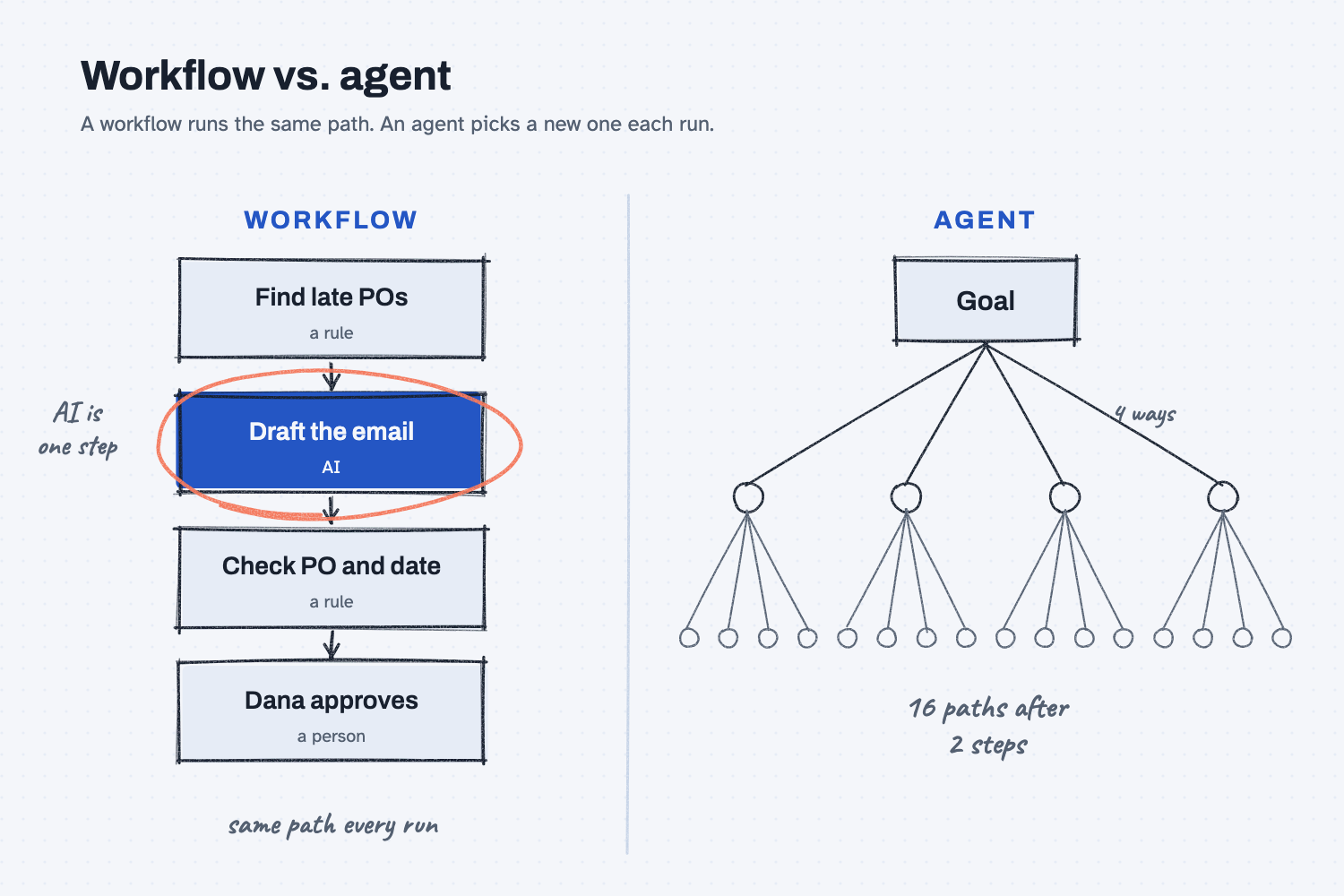
Look at the left side first, which shows a workflow with the same four steps in the same order on every run. AI does only the one step that needs words, and rules and a person handle the rest. Now look at the right side, which shows an agent. After just two choices there are already 16 ways it could go, and after ten choices nobody could guess where it will end up.
Think of it like this
Think about the routing sheet that travels with a job in a machine shop, which lists the steps saw, mill, deburr, and inspect. Every part goes through the same steps in the same order, and that is why part 400 matches part 1.
Now picture handing a machinist a drawing and saying, "Make it however you think is best." For a one-off prototype that might work well, because they will find a clever way to do it. For a run of 500 parts it becomes a mess, because each part could come out a little different.
A workflow is the routing sheet, and an agent is "however you think is best."
Why does it matter at work?
Daily work needs to come out the same way every time, because a path that changes on each run is hard to trust, hard to check, and hard to fix.
Here is an example. Dana Ortiz, a senior buyer at Mesquite Ridge Metal Works, wants AI to chase late POs each morning. First she tries it as an agent and tells it, "Find late suppliers and remind them."
On Monday it writes three emails. On Tuesday it writes two, and it skips one because it read a date wrong. The subject lines and tone change every day, so when a supplier asks "Which email do you mean?", she can't say what went out.
So she sets it up as a workflow instead. A rule pulls the POs that are past their promise date, AI writes the email body, and another rule checks the PO number and date in the draft. Then Dana approves it. Anything odd, such as a supplier reply with a question, comes to her instead of being handled automatically.
Now every morning looks the same, and that is the point. I put it this way: "You don't need variability. You need dependability."
How does it work?
A workflow and an agent can use the very same AI, so the difference is who picks the path.
Small choices add up. An agent makes a choice at every step, and each choice can go several ways. If there are four ways at each of two steps, that is 16 paths. I describe it as a chain where each link can go four ways, and thirty links later nobody can tell you where it ends up.
In a workflow, AI is one step. The steps that follow a rule stay as rules, such as finding the late POs, checking the dates, and filing the email. AI does only the part that needs words or judgment. "You do not want an agent thinking about, oh, what data should I enter? ... we want this thing to run dependable every time."
Odd cases go to a person. A good workflow doesn't guess when something doesn't fit. It stops and hands that one item to you, while everything else keeps moving.
Agents still have a job. They work well when you don't yet know the steps. "That's great when you're creating a plan. It's horrible when you need a specific email sent at a specific time."
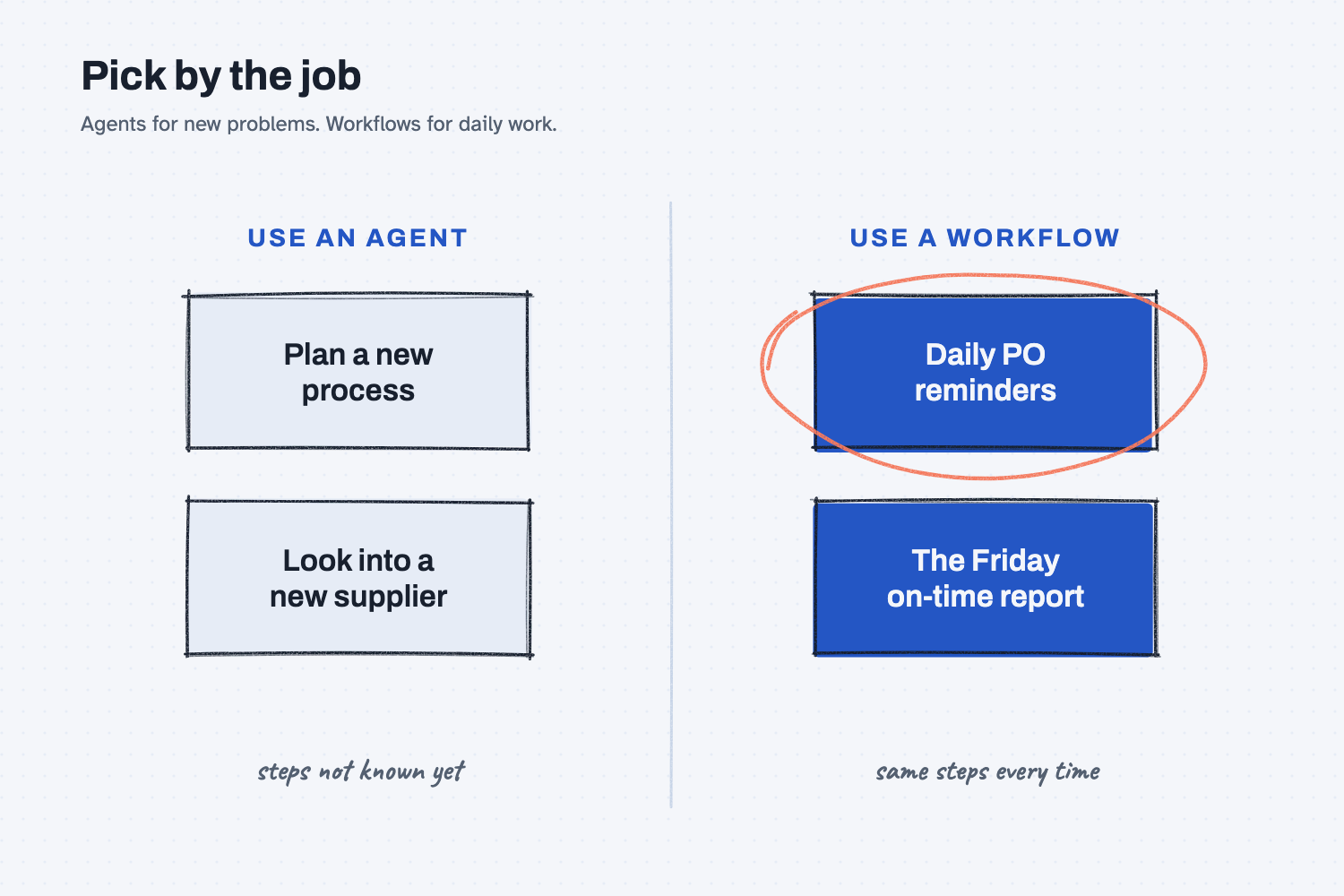
This second picture sorts jobs into the two columns. New or unclear jobs, like planning a process or looking into a new supplier, suit an agent. Repeating jobs, like the daily PO reminders, suit a workflow.
Where do people get it wrong?
Most mistakes come from using an agent where a routing sheet would do. Here are four I watch for.
- An agent for the same job every day. If you can write the steps down, write them down, and let AI do only the step that needs it.
- Letting AI do the rule steps. "Which POs are past due?" is a filter and not a judgment call, so a rule gets it right every time.
- No exit for odd cases. Without an exit the AI will guess, so send anything that doesn't fit to a person.
- Believing the label. Many tools called "agents" are really workflows, which is often a good thing, so ask the vendor to show you the steps it runs.
Try this in 2 minutes
This test compares an open ask with a fixed template, and you can use any chat tool.
- Open a new chat and paste this:
Write a subject line for a reminder email to Red Creek Steel. PO 40118 for MR-3002 was promised Nov 14 and has not arrived.
- Read what comes back, then open a fresh chat, paste the same text again, and compare the two replies.
- Now try a fixed template in a new chat:
Fill in this subject line. Change nothing else.
PO [number] past due: please confirm new ship date
PO number: 40118
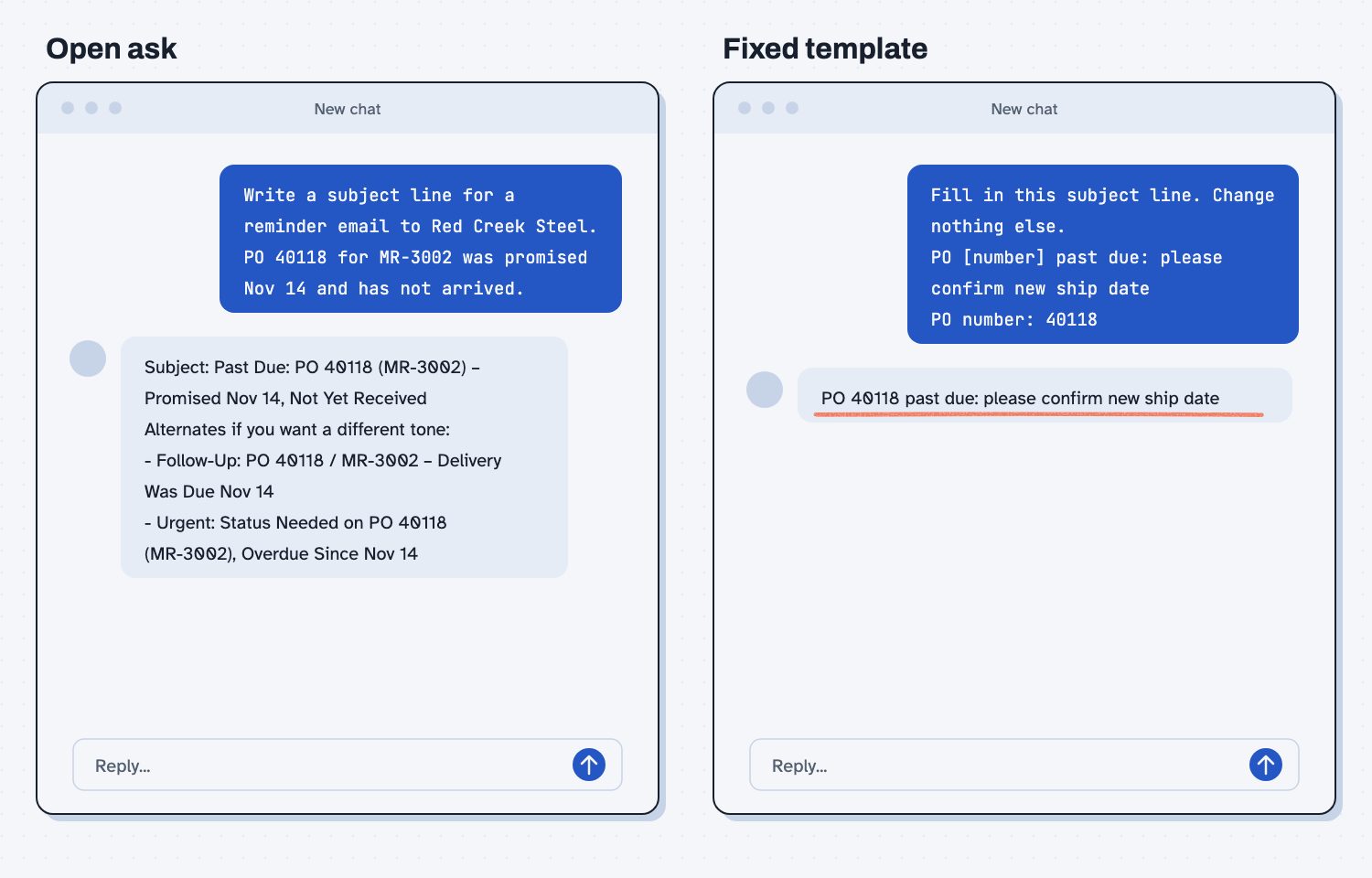
When I tried the open ask, I got a subject line I could use. I also got extras I didn't ask for, under the heading "Alternates if you want a different tone," with a "Follow-Up" line and an "Urgent" line. Claude kept the main line steady, but the extras were a different list in each chat. That leaves you with a menu, and somebody has to pick from it. A different tool or a different day could also change the main line.
The fixed template gave one line: "PO 40118 past due: please confirm new ship date." There were no choices and no tone to pick, which makes it a workflow step. The AI fills in the blank, and the shape never changes.
Frequently asked questions
Is a workflow less smart than an agent?
No, because it uses the same AI. A person decided the steps ahead of time, so the AI spends its effort on the one part that needs it. For daily work, that is the smarter setup.
When should I use an agent?
Use one when you don't know the steps yet, such as planning a new process, looking into something new, or doing a one-off job. Once you have done it a few times and the steps settle, turn it into a workflow.
Why does AI give a different answer each time?
AI picks likely words, not one fixed answer, so small differences show up on each run. Read AI writes one word at a time for why. A template and fixed steps keep that from spreading.
Can I build a workflow without code?
Yes, a simple one. Save the template prompt, paste in today's data, and check the result against your rule before you send. Some tools can run saved steps for you.
Use it today
- Compare supplier quotes the same way every time: fixed steps, with AI only where it reads messy quotes.
From my training: this comes from my framework notes on wiring AI together and how I explain agents to teams. Read chat vs. agent first if the word "agent" is new.