Chat vs. Agent: What Is the Difference in AI?
With Josh Schultz ·
Answer. The difference between a chat and an agent is who does the next step. A chat answers once, and then you do the rest yourself. An AI agent (an AI that works in steps and uses tools) takes a goal, and then plans, acts, and checks its own progress until the job is done.
The picture
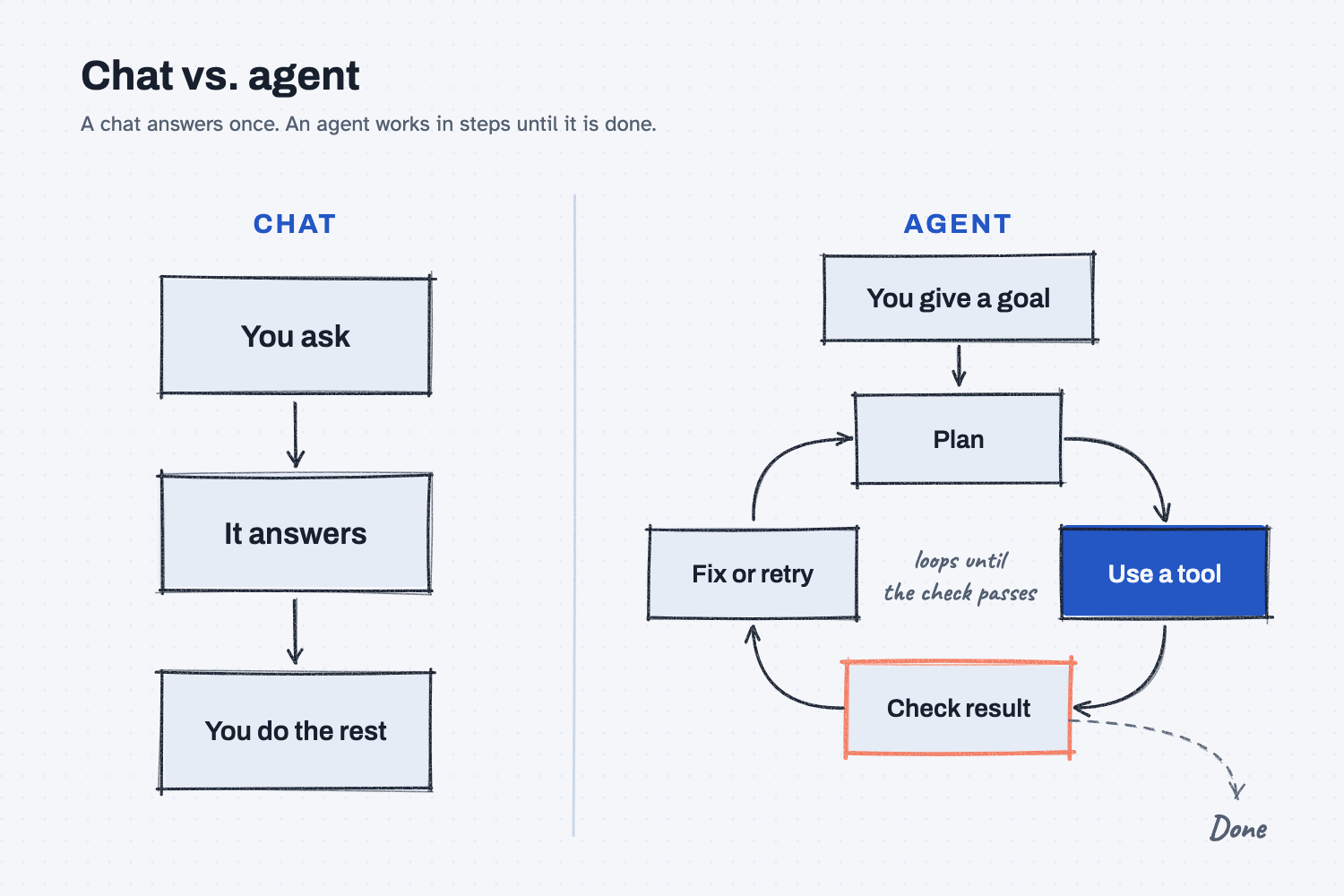
Start on the left, where you ask a question, the chat answers, and the rest of the work is yours. Now look at the right, where you give the agent a goal and it goes around the loop on its own, planning, using a tool, and checking the result. It only stops when the check passes.
Think of it like this
A chat is like the parts counter. You walk up and ask, "Do we have MR-2001 in stock?" and you get an answer, and then you walk back and do the work yourself.
An agent is like a work order. You hand a tech a job, such as "Rebuild the pump on the press brake by Friday," and they plan it, pull parts, use their tools, test it, fix what failed, and test again, without you telling them every step.
A good work order also has a sign-off box, because nobody ships a part until someone checks it. An agent needs that box too.
Why does it matter at work?
A chat and an agent need different things from you. A chat needs a good question, but an agent needs a good plan, because it makes calls on its own while you are not watching.
Here is how that plays out. Dana Ortiz, a senior buyer at Mesquite Ridge Metal Works, asks a chat, "Which POs are late?" She reads the answer, checks it, and writes her own emails, which works fine.
Then the team tries an agent that reads the PO export and emails every late supplier. Nobody wrote down "don't chase a PO that isn't due yet," so the agent sends Bolt Barn a reminder for an order due in two days, and their rep calls, a little annoyed.
The agent did not break. It filled a gap in the plan, which is what my framework notes warn about: "Every decision you leave out of the plan, the agent makes for you."
How does it work?
A chat is one turn, while an agent is a loop. Here are the parts.
A chat answers from its desk. You type, and it reads what is on the desk (the context window) and answers. It cannot open your ERP or send an email, and in my notes I say a plain AI "cannot touch the world."
An agent goes around a loop. It thinks, picks a tool, uses it, looks at what happened, and repeats. Tools are the things it can reach, such as a web search, a spreadsheet, your email, or your ERP. In my notes: "Think, pick a tool, act, observe, repeat until done. This is what 'agent' means."
A workflow sits in between. A workflow is a set of fixed steps that someone designed ahead of time, where the AI fills in each step but does not pick what comes next. "Workflows are predictable and cheap. You know every step that will run. Most business value lives here." Use an agent when you do not know the steps up front.
People and agents split the job. "Humans plan. Agents do. Both check." You write the rules and what good looks like, and the agent does the work inside those rules. Then you check what matters, most of all anything that cannot be undone.
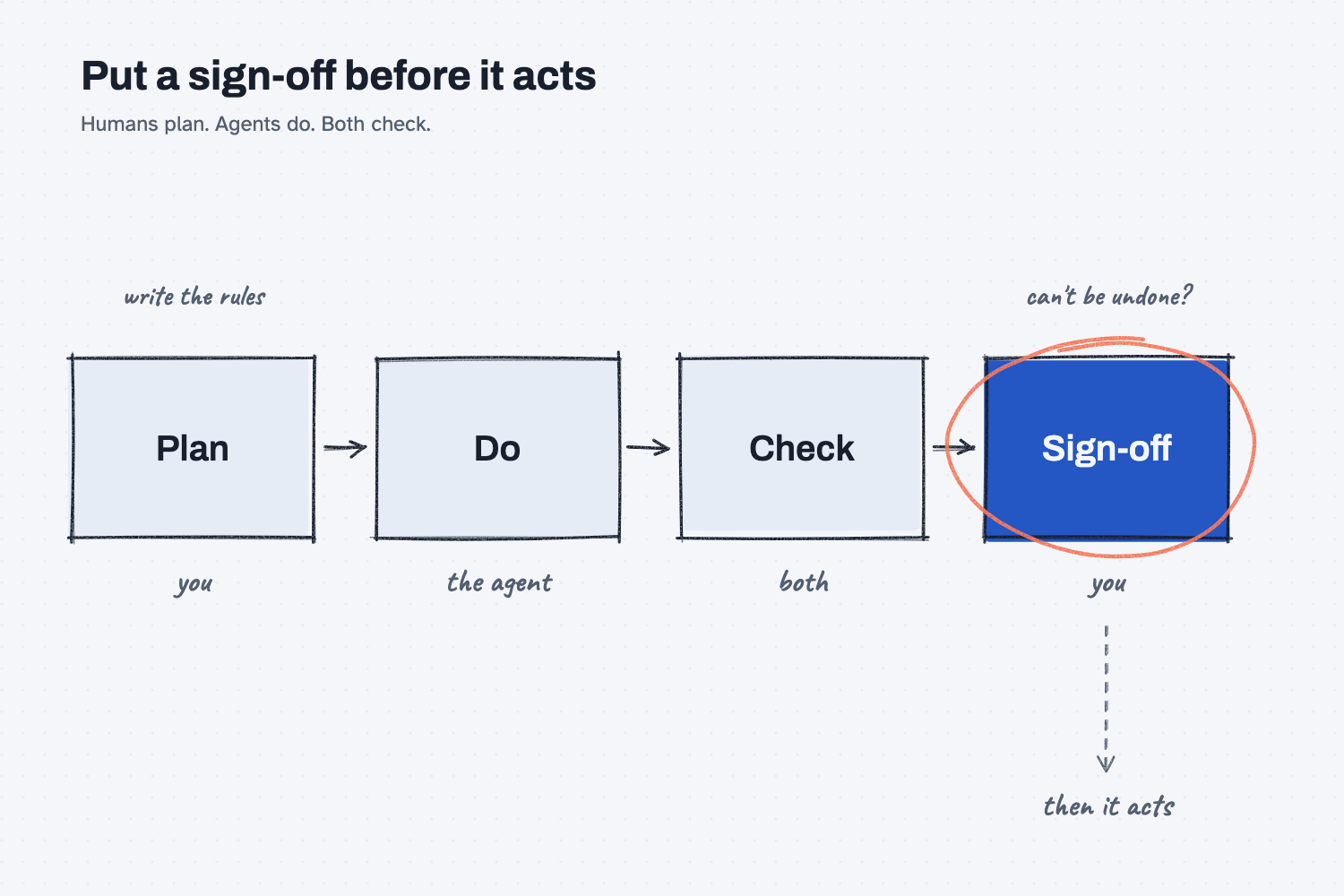
In the picture, you own the plan and the sign-off, the agent does the work, and both of you check. The circled sign-off comes before the agent acts, which is why nothing leaves the building without your yes.
Where do people get it wrong?
Most mistakes come from treating an agent like a smarter chat. These are four I would watch for.
- Calling every chatbot an agent. If it cannot use a tool or take a next step on its own, it is a chat, so ask the vendor one question: what can it touch?
- Keeping the rules in your head. The agent cannot ask you in the middle of a job, so write the rules down, such as "only chase POs that are past due."
- Trusting the agent's own check. In my test below, the check step ended with "Fixes: None needed." That may be true, but the agent graded its own work, and a real check uses a rule, a formula, or a person.
- No sign-off before it acts. Emails, POs, and price changes are things it cannot take back, so they should get a yes from you first.
Try this in 2 minutes
A plain chat cannot use real tools, so this test shows an agent's habits rather than a real agent. You can use any chat tool.
- Open a new chat and paste this list:
Today is November 19.
PO 40112, Red Creek Steel, MR-3001, promised Nov 10, received Nov 12
PO 40118, Red Creek Steel, MR-3002, promised Nov 14, not received
PO 40125, Bolt Barn Industrial, MR-2001, promised Nov 21, not received
PO 40131, Panhandle Bar and Plate, MR-3001, promised Nov 3, not received
PO 40140, Blue Heron Coatings, MR-2010, promised Nov 18, received Nov 18
Under the list, add this and send:
Which POs are late? Draft one short reminder email per supplier.
- Open a second new chat and paste the same list, and under it add this instead:
Work in steps, like an agent.
1. Plan: list the steps you will take.
2. Do: find the late POs and draft one short reminder email per supplier.
3. Check: compare each email to the data above. Fix anything wrong.
4. Stop: ask me to approve before anything is sent.
- Compare the two. Did the first one write to Bolt Barn? Did the second one show its plan and its check, and then stop and ask?
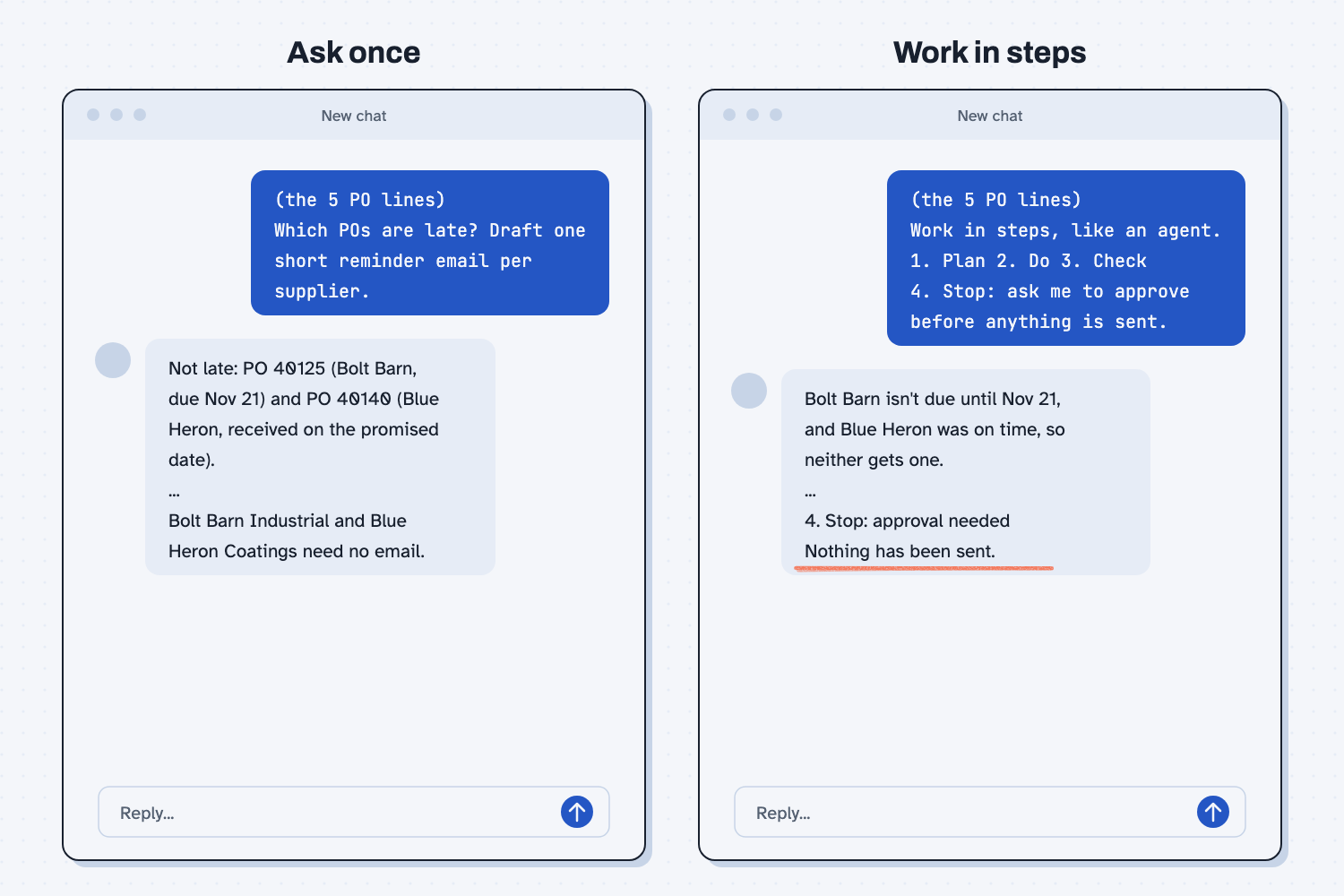
When I tried this, the one-line ask caught the trap on its own. It listed what was late, and then said: "Bolt Barn Industrial and Blue Heron Coatings need no email." It had no plan to follow and no check to run, and it simply handed me the drafts.
The step-by-step ask did the same sorting, but it showed its work. It said: "Bolt Barn isn't due until Nov 21, and Blue Heron was on time, so neither gets one." Then it stopped: "4. Stop: approval needed. Nothing has been sent."
So the lesson is not that a chat will get it wrong, because this time it got it right, and you should not count on that. The steps are what give you a plan to read, a check to question, and a stop before anything leaves your hands, which is why the sign-off stays with you.
Frequently asked questions
Is ChatGPT a chat or an agent?
Both, depending on the mode. When you type a question and read the answer, it is a chat. When a tool can search the web, run code, or work in your apps on its own, it is acting as an agent, so ask what it can touch.
When is a plain chat the better tool?
When you want one answer that you will check yourself, such as a draft, a summary, or a formula. A chat is faster and cheaper, and you can see everything it did.
Is a workflow the same as an agent?
No. A workflow follows steps a person designed ahead of time, while an agent picks its own next step. Most office work fits a workflow better than an agent.
Are AI agents safe to use at work?
They can be, with guardrails: "a step limit, a budget, a human gate, and an audit trail." Start with agents that draft for you, not agents that send for you.
Use it today
- Compare three supplier quotes: a plain chat reads three quotes, and you check the answer.
From my training: this comes from my framework notes on how AI pieces get wired together, and the Plan, Do, Check, Act model I use with every team. Read how to stack context for AI next.