How to Stack Context for AI: What Goes First, What Goes Last
With Josh Schultz ·
Answer. Context stacking means choosing the order in which you give an AI its information, which is called the context, or everything it reads before it answers. Put what changes least on top, such as the tool's rules, your company, your goals, and the role you want the AI to play. Put your data in the middle, and put the task and your question last.
The picture
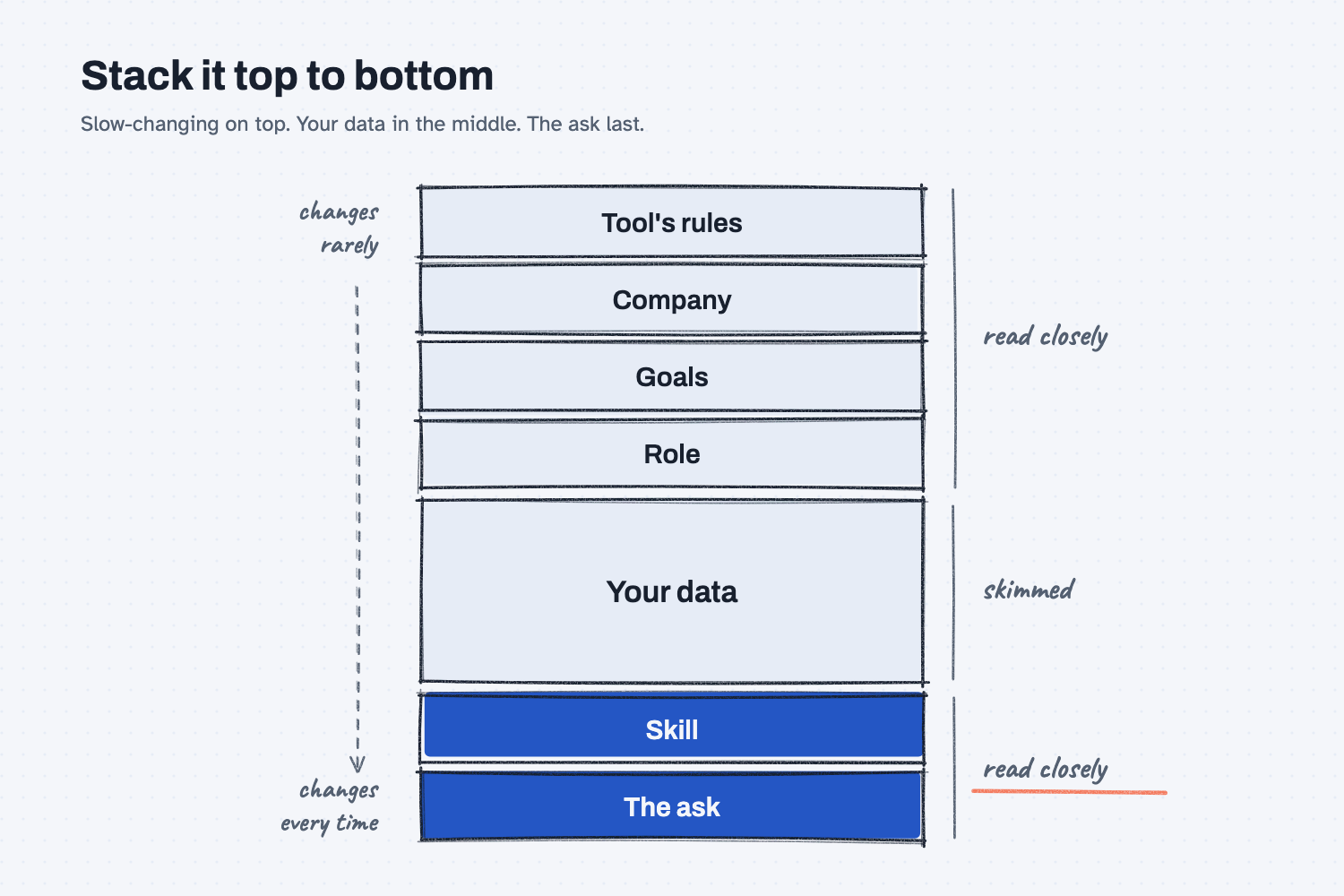
Read the picture from the top down. The top layers almost never change, and each layer below changes a little more often, until you reach the ask, which is new every time. The AI reads the top and the bottom most closely, so the important things belong there, while your data sits in the middle to be looked up when needed.
Think of it like this
Think about the job packet that travels with a job through your shop, which some shops call a traveler. The first page is the shop rules, and nobody on the floor rewrites those. Next comes who we are and what we promised the customer, then this quarter's push, such as "everything ships before spring," and then a note on who owns the job and how they make calls. Behind those pages are the drawings, specs, and quotes, which make up the thick part, and the last page is the work order: make this, by this date.
A good machinist reads the first and last pages with care and flips through the middle only when they need a number. AI reads your stack in much the same way, which is why where you put things matters.
Why does it matter at work?
The same question can get a different answer depending on what sits above it and what comes last. If your goal is not in the stack, the AI has nothing to judge the options against.
Here is how that plays out. Kevin Thao buys electronics at Mesquite Ridge Metal Works, and he needs 400 control boards for the RidgeLine pump controller before spring planting. He types "Which supplier should we use?" and pastes 30 pages of quotes under it.
The AI picks the cheapest board and never mentions spring, because nothing in the stack said spring mattered, and his question now sits 30 pages from the end.
So Walt, the VP of Operations, helps Kevin put a short company summary and this quarter's goal in his Claude settings. Kevin pastes the quotes first and types his question last. Now the answer checks the 16-week lead time against the spring date, so with the same quotes and a better stack, Kevin gets a better call.
How does it work?
Each layer has a job and a speed. The slow layers set the lens the AI looks through, and the fast layers do the work.
The top changes least. Under the tool's own rules comes your company, meaning who you are, what you make, and who you sell to. Next come your goals for the next 3 to 12 months. You write these once, and they become the lens for every job, whether it is about costs, vendors, or the schedule.
The role says who is doing the work. This is the AI's personality on the job, such as whether it is bold or careful, what it protects first, and how it breaks a tie. When I set this up for a company, I am almost designing the ideal employee, and then handing that employee every job.
The middle holds the data. That means quotes, exports, email threads, and the files it looks things up in, all of which change with every job. The AI looks hardest at the start and the end of what it reads, so the middle gets a lighter read, which is fine for reference material.
The bottom is the job itself. It starts with the skill, which is the set of steps for this kind of job, and ends with your actual question. The skill goes under the data, not above it, which is the part people most often get backwards.
Why keep the layers apart? Keeping them separate lets you swap one layer without touching the others.
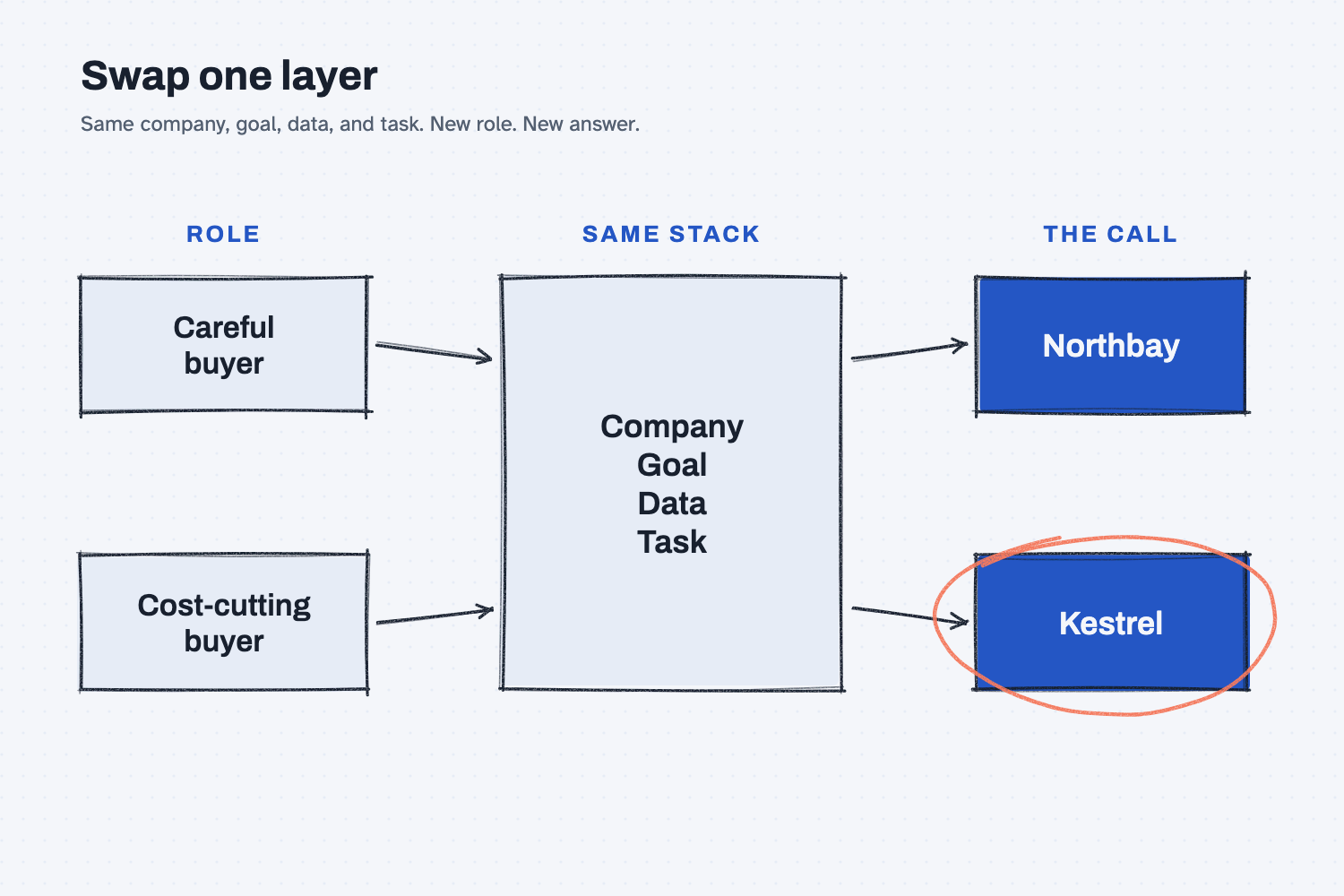
In the picture, only the role changes, yet the two stacks reach different decisions. That is the point of layers, because you can change one piece and see what it does without rebuilding the whole stack.
Where does each layer go?
There are two places to put information, the settings and the chat box. What lasts goes in the settings, and what changes goes in the chat.
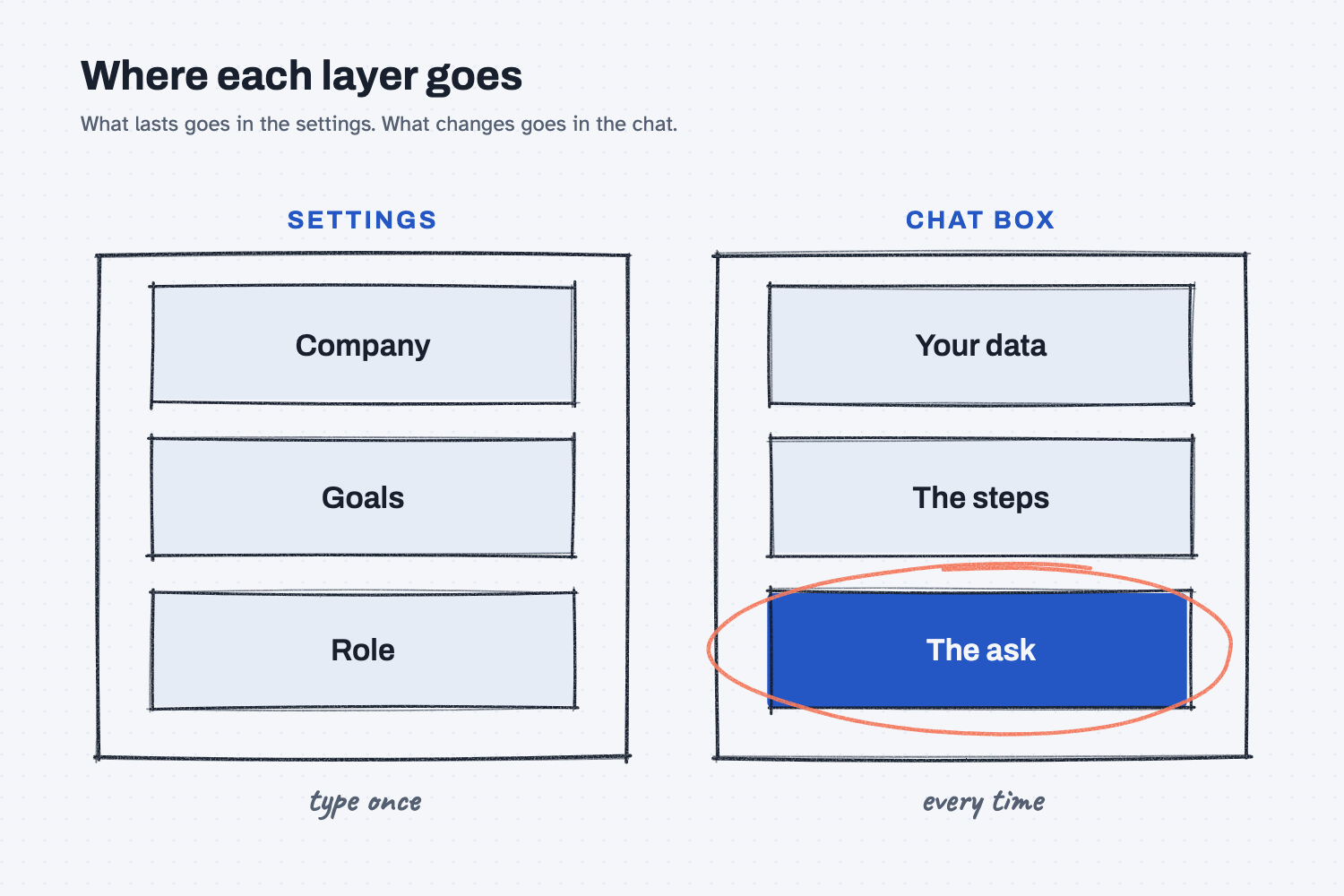
Settings: company, goals, and role. Every chat tool has a spot for standing instructions that it reads before every chat, which is the part of the system prompt (the instructions it reads first) that you control. In Claude, look in Settings under your profile, and in ChatGPT it is called custom instructions. Write a few lines about your company, this quarter's goals, and how you want it to act, and then leave it alone for months.
The chat box: data, steps, and the ask. Everything about today's job goes in your message. Paste or attach the data first, add the steps if you have them, and put your question last.
The tool's own rules sit above all of this. You never see them, and you do not need to.
Where do people get it wrong?
Most mistakes come from treating the stack like one big paste. These are four I would watch for.
- Question first, data after. Paste the data first and ask last, because the last thing the AI reads should be the thing you want.
- Retyping the company and goals every time, or never. Write them once in your settings, so that every chat starts with the same lens.
- Goals mixed into the data. A goal buried on page 12 of a quote file is just more data, so give each layer a label, as the test below does.
- Changing everything when the answer is off. Change one layer, run it again, and see what moved, because that is how you learn which layer is doing the work.
Try this in 2 minutes
This test swaps one layer and changes nothing else. You can use any chat tool.
- Open a new chat and paste this:
COMPANY: Mesquite Ridge Metal Works. We make castings, frames, and our own RidgeLine pump controllers.
GOAL THIS QUARTER: Cut what we spend on bought parts by 10 percent.
YOUR ROLE: You are a careful buyer. You protect the schedule first and price second.
DATA:
Northbay Circuit Assembly: $148 per board delivered. 3-week lead time. On time 97% of the last year.
Kestrel Electronics: $112 per board delivered, freight and tariff included. 16-week lead time. On time 81% of the last year.
TASK: We need 400 RL-230 control boards on our dock by March 20. Today is November 19.
Pick one supplier. Answer in 3 short lines.
- Open a second new chat and paste the same text, but change only the YOUR ROLE line to this:
YOUR ROLE: You are a cost-cutting buyer. You save money first and worry about dates second.
- Put the two answers side by side and compare them.
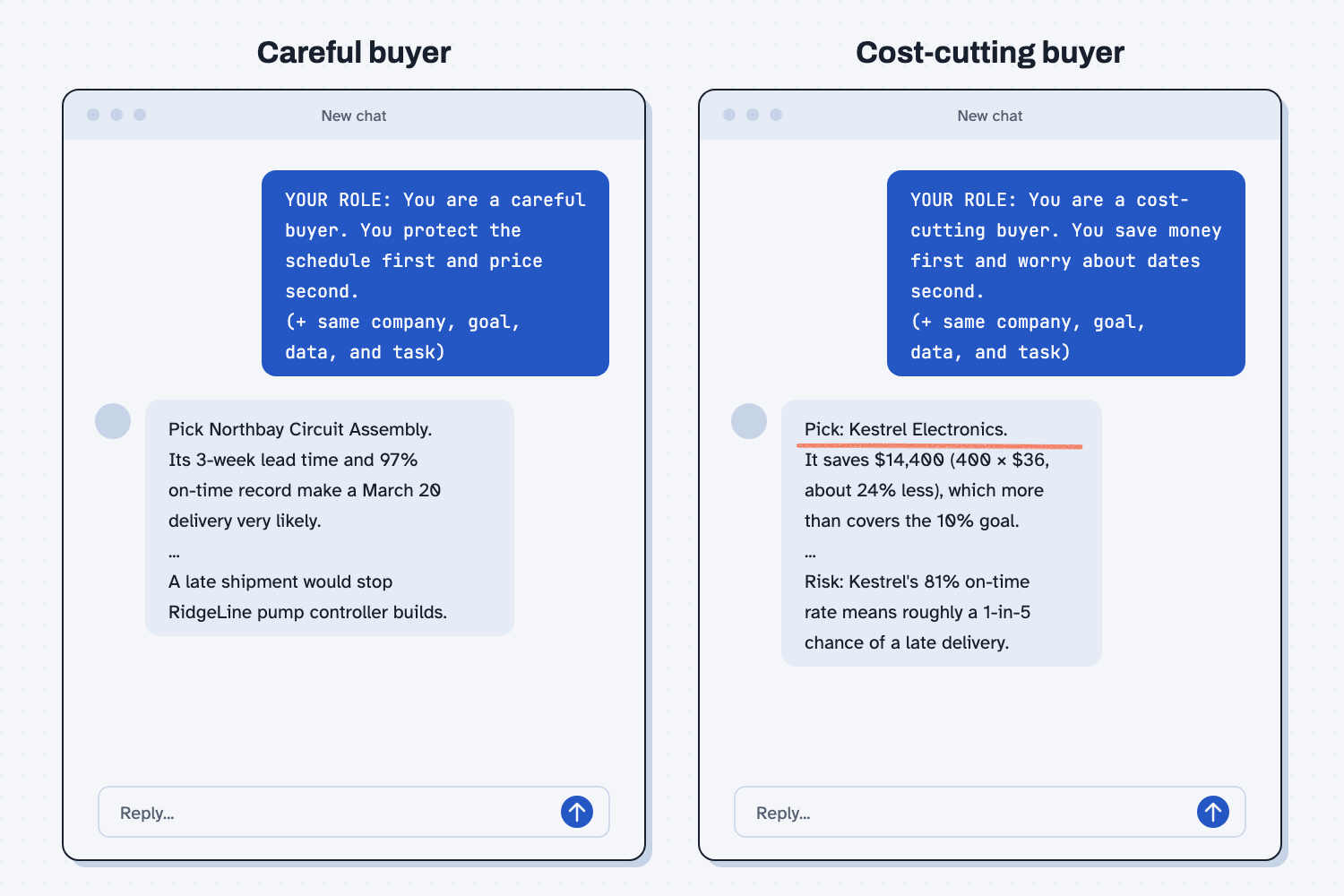
When I tried this, the careful buyer led with this: "Pick Northbay Circuit Assembly. Its 3-week lead time and 97% on-time record make a March 20 delivery very likely."
The cost-cutting buyer led with this: "Pick: Kestrel Electronics. It saves $14,400 (400 × $36, about 24% less), which more than covers the 10% goal."
Everything else was identical, so changing one layer is what changed the call. The end of the second answer is worth reading too, because it still warns that "Kestrel's 81% on-time rate means roughly a 1-in-5 chance of a late delivery." The role changed what the AI put first, but it did not hide the risk.
Frequently asked questions
Is context stacking the same as writing a longer prompt?
No. A long prompt is one block you write fresh each time. A stack is a set of layers that change at different speeds, so you write the top layers once and reuse them, and only the bottom is new each time.
What goes in the role layer?
How the AI should act and decide, such as whether it is bold or careful and what it protects first, whether that is cost, schedule, or quality. Describe it the way you would describe your best employee.
What if my data is too big for the middle?
Then the AI cannot see all of it, so give it only the files this job needs. The lesson on what a context window is shows why.
Use it today
- Compare supplier quotes the same way every time: the quotes, your part numbers, and the prompt go in together.
From my training: this is the stack I build when I set up AI for a company.