Can AI Read PDFs and Images? Yes. Hand It the Paper
With Josh Schultz ·
Answer. Can AI read PDFs and images? Yes. Most chat tools can read a photo, scan, screenshot, or PDF you drop in (this is called multimodal, which means it reads pictures and not just typed words), so you do not have to retype the packing slip. It mostly answers what you ask, though, so ask for everything and check the numbers.
The picture
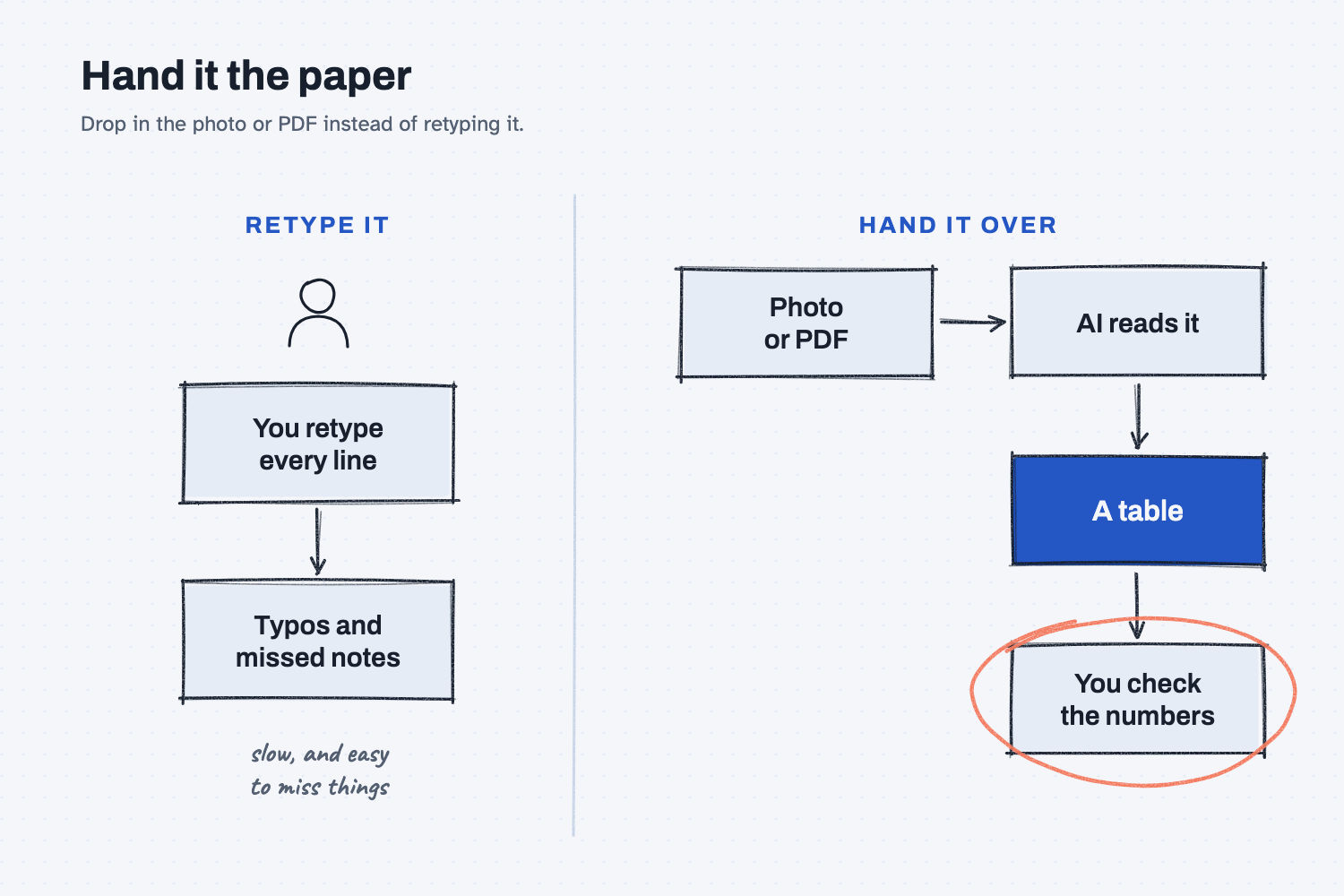
On the left, you do the reading and the typing yourself, one line at a time, which leads to typos and missed notes. On the right, you hand over the page itself, the AI does the reading, and you do the checking. That last box is the one people skip, so it is circled.
Think of it like this
Say you are on the dock and a new hire is in the office, and you need them to log a packing slip. You could read it to them over the phone, saying "MR, dash, three-zero-zero-one, twenty-four bars." That is slow, they might mishear a digit, and you would never think to read them the note somebody scribbled in the margin.
Or you could snap a photo and text it to them. Now they can see the whole page, including every line, every stamp, and every scribble.
Retyping a document into a chat is like reading it over the phone, and dropping in the photo or PDF is like handing over the paper. There is one catch, which is that the new hire still has to look at the margin, and so does the AI.
Why does it matter at work?
You save the typing and you stop adding your own typos, but a quick answer can still miss the one line that matters.
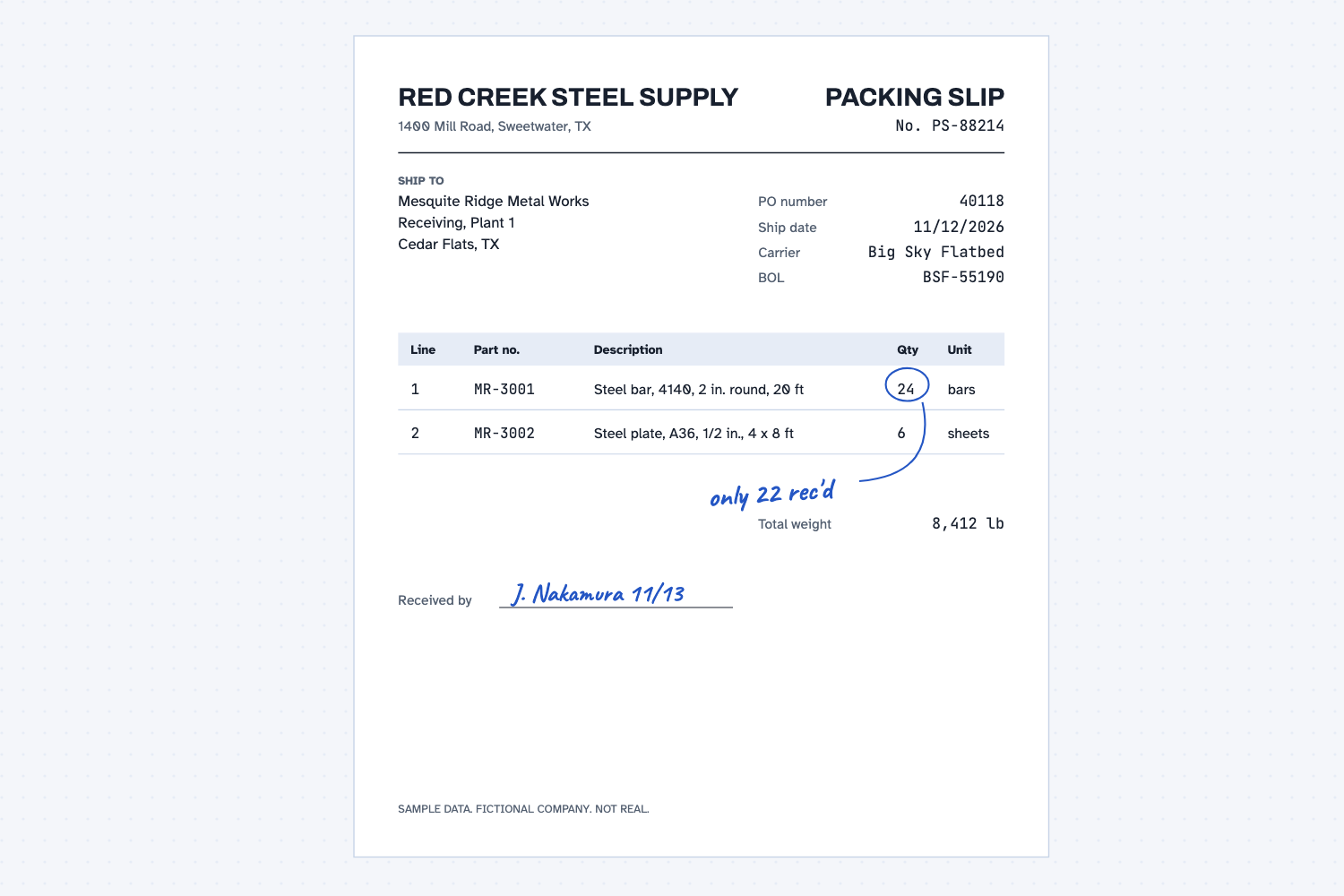
Here is how that plays out. Jen Nakamura, the logistics coordinator at Mesquite Ridge Metal Works, signs for a load of steel from Red Creek Steel Supply. The slip says 24 bars, but the dock counted 22, so she writes "only 22 rec'd" next to the number.
Back at her desk, she drops a photo of the slip into a chat and asks for a table of parts and quantities. Say the tool hands back a clean table that shows 24 bars. She forwards it to Dana in purchasing, and Dana approves the invoice for 24.
Nothing in the table would be wrong, because every printed number is right. The tool simply answered the question Jen asked, and she never asked about the note. Some tools do exactly that. When I tested this slip, the AI caught the note on its own, but don't count on that, and ask for it.
How does it work?
The AI looks at the whole page and then answers the question you asked. There are four things worth knowing.
It reads more than you would think. It can read photos, screenshots, scans, PDFs, charts, and even a photo of a whiteboard. In most tools you drag the file into the chat or click the paperclip.
PDFs come in two kinds. Some have real text inside because a computer made them, and some are only pictures of paper because someone scanned them. The AI can read both, but scans are harder, much like a faxed copy.
It reads what you point it at. If you ask for the table, you get the table, and some tools stop there while others add a note about the margins on their own. Ask "Is anything handwritten or stamped?" so you never have to guess.
It slips on the hard stuff. Small or faint print, messy handwriting, and digits that look alike, such as 1 and 7 or 5 and 6, are where it makes mistakes. Very long PDFs can also fill its desk, and the lesson on what a context window is explains why.
Where do people get it wrong?
Most mistakes come from asking too little or checking too little. These are four to watch for.
- Asking only for the table. You may get the printed lines and nothing else, so add one line: "Then list anything handwritten or stamped."
- Trusting look-alike digits. Check every part number and quantity against the paper, which takes about thirty seconds.
- Still retyping. Many people do not know they can drop in the photo, so if you are typing from paper, stop and try it.
- Uploading real customer paperwork to a free tool. Use the tool your company approved, or use a fake or old document for practice.
Try this in 2 minutes
You can use the slip above, or any old packing slip or invoice, and a phone photo is fine. Use a chat tool that lets you attach a file.
- Save the slip image above, or take a photo of your own.
- Open a new chat, attach the image, and paste this:
Read this packing slip. Give me a table: part number, description, quantity, unit. Then the PO number.
- Open a second new chat, attach the same image, and paste this:
Read this packing slip. Give me a table: part number, description, quantity, unit. Then the PO number. Then list anything handwritten.
- Compare the two answers, and then check every number against the paper.
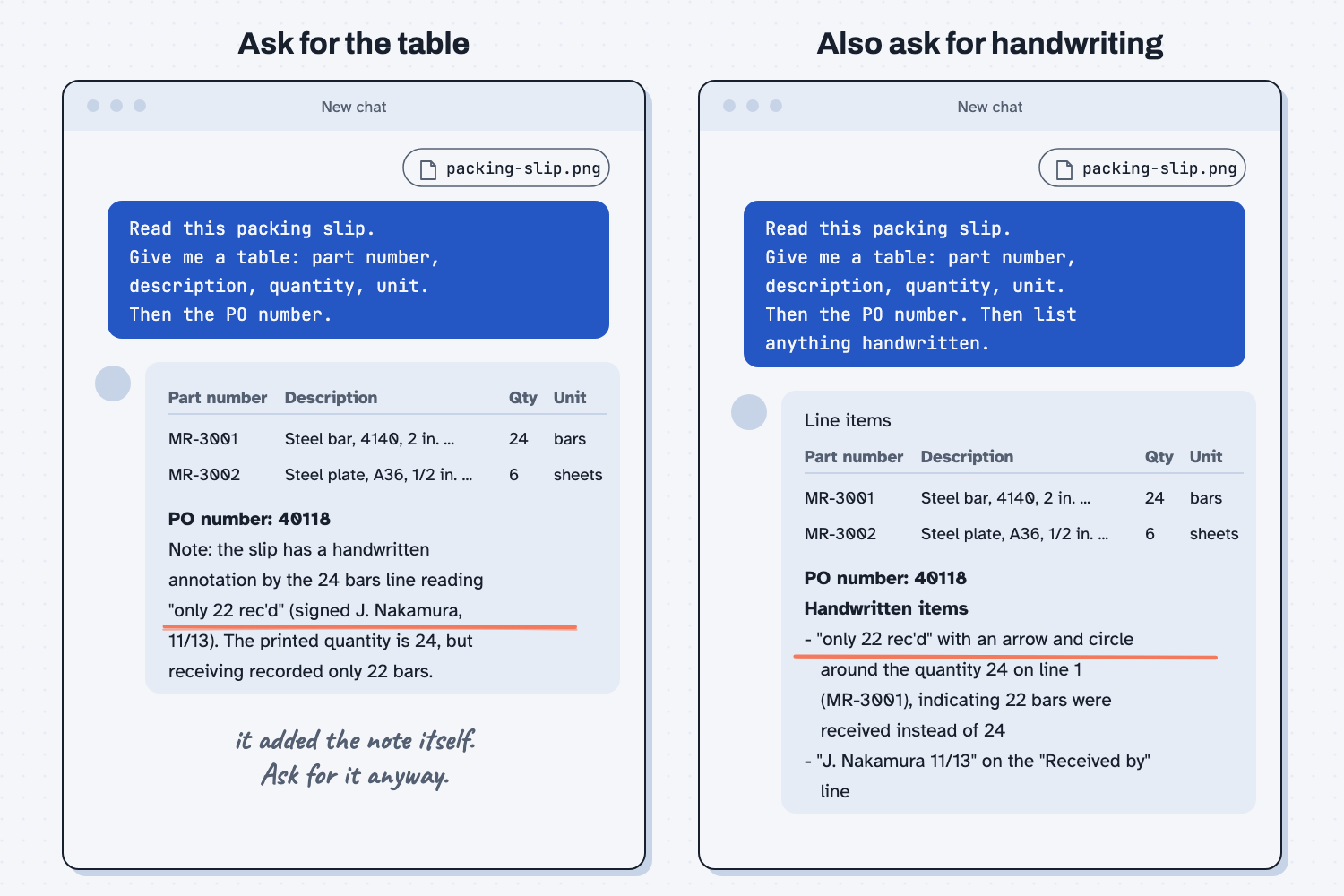
When I tried this, I asked only for the table, and the AI read every printed number correctly. Then it added a note I never asked for:
Note: the slip has a handwritten annotation by the 24 bars line reading "only 22 rec'd" (signed J. Nakamura, 11/13). The printed quantity is 24, but receiving recorded only 22 bars.
That is a good catch, but the table itself still said 24. Another tool, or a messier page, might skip the note, so ask for it.
When I added "Then list anything handwritten," the answer was clearer. It listed two items:
- "only 22 rec'd": written in blue, with a hand-drawn circle around the quantity 24 on line 1 (MR-3001) ... This indicates only 22 of the 24 bars were actually received, a shortage of 2.
- "J. Nakamura 11/13": written on the "Received by" line ...
The picture was the same, and only one more line in the ask changed. Now you do not have to hope the AI notices the note.
Frequently asked questions
Can AI read handwriting?
Often, if it's neat. In my test it read a short handwritten note and said which number it pointed to. Messy handwriting is where it slips most, so check those words yourself.
Does it work on scanned PDFs?
Usually. A scan is a picture of paper, so the AI reads it like a photo. Faint or crooked scans are harder. If a scan is bad, take a clear phone photo instead.
Can it read a screenshot of a spreadsheet?
Yes. It can read the numbers off a screenshot. But if you need math, export the file and let Excel do the math. Reading a number and adding numbers are different jobs.
Is it safe to upload company paperwork?
Only in a tool your company approved for it. Free tools may keep what you upload. For practice, use a fake document or one with no customer or price data.
Use it today
- Compare supplier quotes the same way every time: Claude reads quotes that arrive as PDFs, emails, and spreadsheets.
From my training: this is a starter lesson. A real example from one of my sessions will replace the test above.