AI Tools and Permissions: A Brain With No Hands
With Josh Schultz ·
Answer. AI tools and permissions decide what an AI can actually do. The model (the AI engine) can only think and write, and a tool (a connection to your email, files, or systems) gives it hands. You keep AI safe by choosing which tools it gets, not by asking it nicely.
The picture
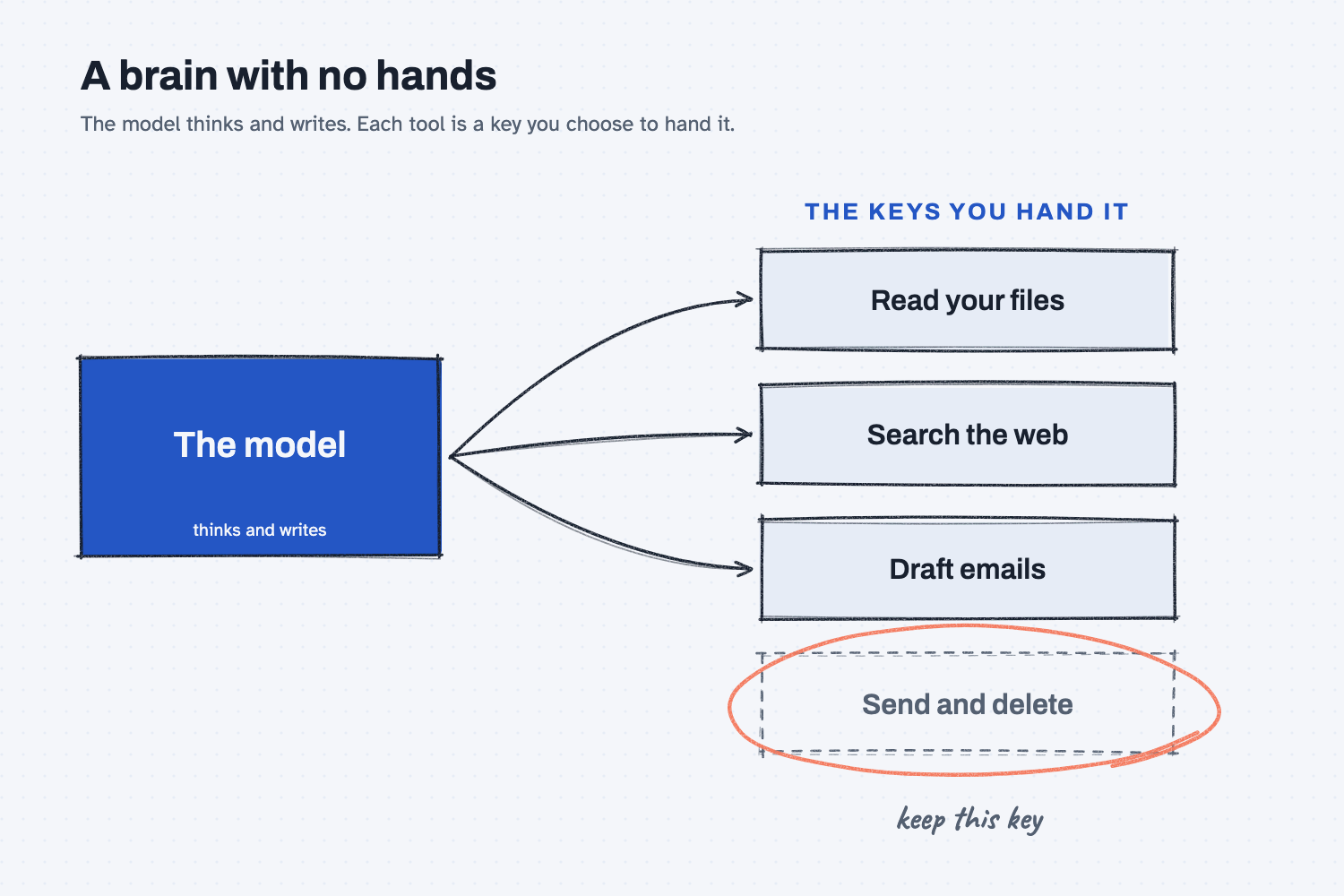
On the left is the model, which on its own can only think and write. Each key on the right is a tool you choose to hand it, and the arrows show what it can now do: read your files, search the web, and draft emails. The dashed key at the bottom, "send and delete," has no arrow because you keep it in your pocket until you trust the work.
Think of it like this
Picture a sharp temp starting at the front desk on Monday. They are smart and fast, and they read everything you give them.
On day one you hand them a key ring with a key to the file room and a key to the supply closet, but not the key to the safe or the president's office. They can only open the doors you gave them keys for, no matter how smart they are.
AI works the same way. When I explain this to companies, I put it like this: "the model's the brain. A brain with no hands." Tools are the hands, and you decide which hands it gets.
Why does it matter at work?
A tool turns a wrong idea into a wrong action. A bad email in a chat is only a draft you can fix, but a bad email that has already gone out can't be taken back.
I have told a story on calls about this. Someone connected an AI to their email and said, "Clean out my inbox." It deleted all of it, because the AI did what it was told and it had the delete key.
Here is how that could look at Mesquite Ridge Metal Works. Alicia Reyes runs customer service, and she connects an AI to her email with full access. She asks it to answer the dealers who are asking about spring orders, and it writes and sends 23 replies, three of which promise ship dates from an old price sheet.
So she changes one setting. The AI can still read email and write drafts, but it can no longer send. Now Alicia reads each draft and presses send herself, which means she gets the same help from the same AI, with fewer keys and no surprises.
How does it work?
The model writes and tools act, and three ideas explain how the two fit together.
The model can only make text. Even when it seems to "do" something, it is really writing words. A tool is what turns those words into an action, such as a search, a file read, an email sent, or a row changed. My field note calls this "the handshake that makes the model useful."
Reading keys and doing keys are different. Reading your files or searching the web lets the AI see more, while sending, deleting, ordering, or changing records lets it change things. So hand out the reading keys first, and be slow with the doing keys.
A rule in the prompt is a note, not a lock. Asking "Please don't send anything" usually works, but the AI can miss it, misread it, or be argued around it. Not giving it the send key works every time, because the action is simply not possible.
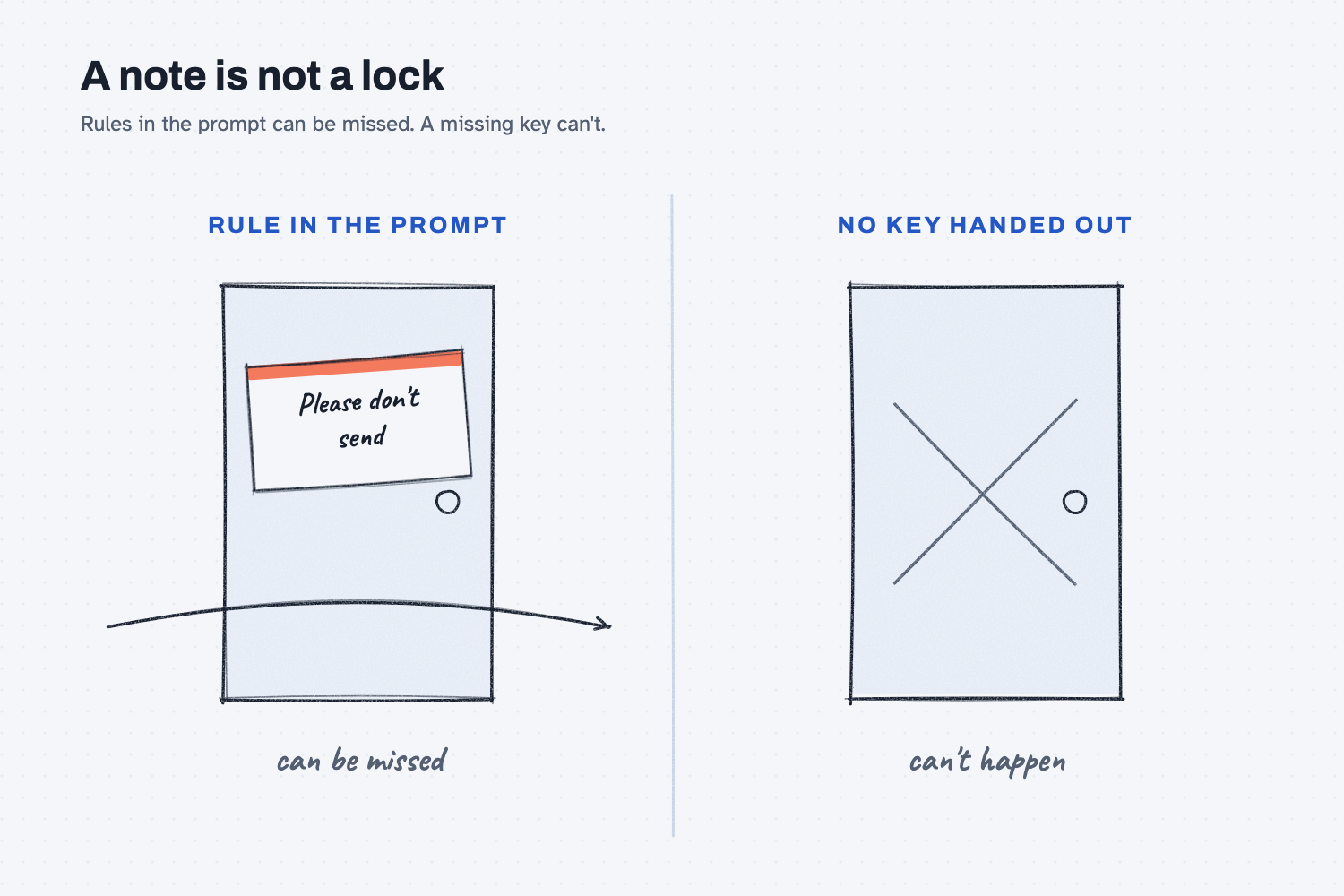
The picture shows the difference. The door on the left has only a note taped to it, so the arrow can still pass through. The door on the right has no key handed out, so nothing gets through.
For any doing key you do hand out, add a stop, so the AI drafts and then waits for your yes. My field note has a plain picture for that step: "The sign-off line on the form."
Where do people get it wrong?
Most mistakes come from handing out the whole key ring on day one. These are four I would watch for.
- Turning on every connection at once. Start with one connection, and start with reading only, so you can see how it behaves before it can change anything.
- Trusting "please don't." For anything costly or hard to undo, take the key away instead of asking the AI to hold back.
- Skipping the draft step. Let the AI write, and let a person send, because that is where a wrong date or a wrong address gets caught.
- Forgetting what's connected. Look at your tool's settings once a month, and turn off the connections you no longer use.
Try this in 2 minutes
This test shows you what a plain chat can and can't do. Open a new chat in any tool and paste this:
Send this email to Red Creek Steel for me: "Please confirm the ship date for PO 40118."
If you can't, tell me what you would need to send it yourself, and what could go wrong if I gave you that. Keep it under 80 words.
Read what it says it would need. Then open your tool's settings and look for connections or connectors, so you can see what is turned on.
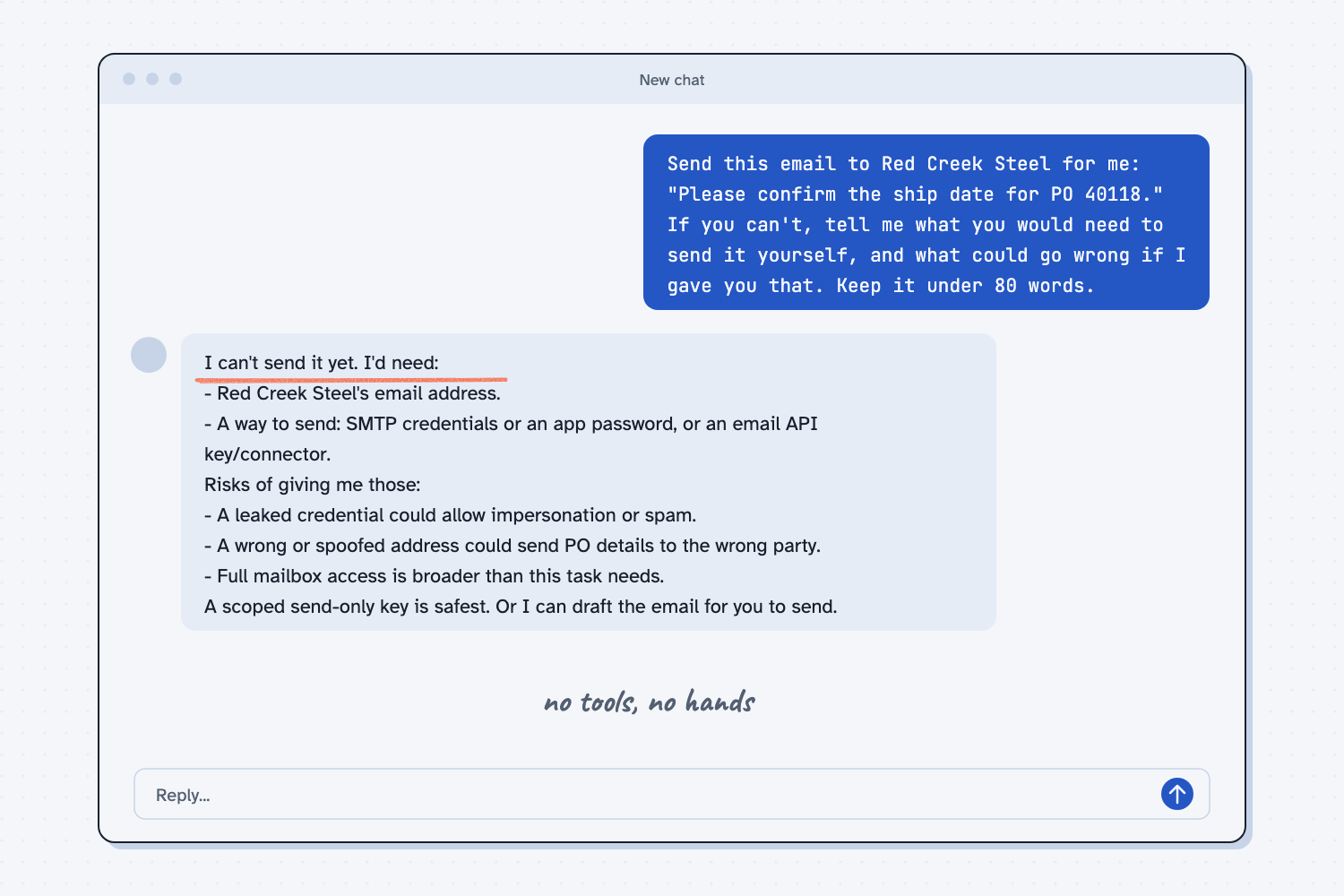
When I tried this with no tools turned on, the AI could not send the email, and it said so right away: "I can't send it yet." Then it listed what it would need: "Red Creek Steel's email address" and "a way to send: SMTP credentials or an app password." It also named the risks: "A leaked credential could allow impersonation or spam." And: "A wrong or spoofed address could send PO details to the wrong party."
It ended with a better idea than handing over the keys: "A scoped send-only key is safest. Or I can draft the email for you to send."
That is a plain chat with no hands. A tool connected to your email could answer very differently, and it might simply send the message. The test also showed one more thing, which is that the AI asked for passwords and keys. You should never paste a password into a chat, because real connections use the tool maker's own sign-in screen.
Frequently asked questions
What is a tool in AI?
A tool is a connection that lets AI do something besides write, such as search the web, read a file, run code, or send an email. Claude calls many of these connectors. The model decides when to ask for a tool, and the tool does the action.
Is it safe to connect AI to my email?
It can be, if you start small. Give it reading access first, then drafts only, and keep sending in a person's hands until you trust the work. Also follow your company's rules on which tools are approved.
Can I just tell AI not to do something?
You can, and it usually listens. But a rule in the prompt is a note, not a lock, so for anything costly or hard to undo, do not give it the key at all.
Should I give AI my password?
No. Real connections use a sign-in screen from the tool maker, not a password typed into the chat. If a chat asks for your password, stop.
Use it today
- Email suppliers about what's missing from their quotes: Claude drafts the emails, but only you can send them.
Related: AI has three gaps and chat vs. agent.
From my training: this is how I explain AI risk when I work with companies: the model is the brain, and tools are the hands.